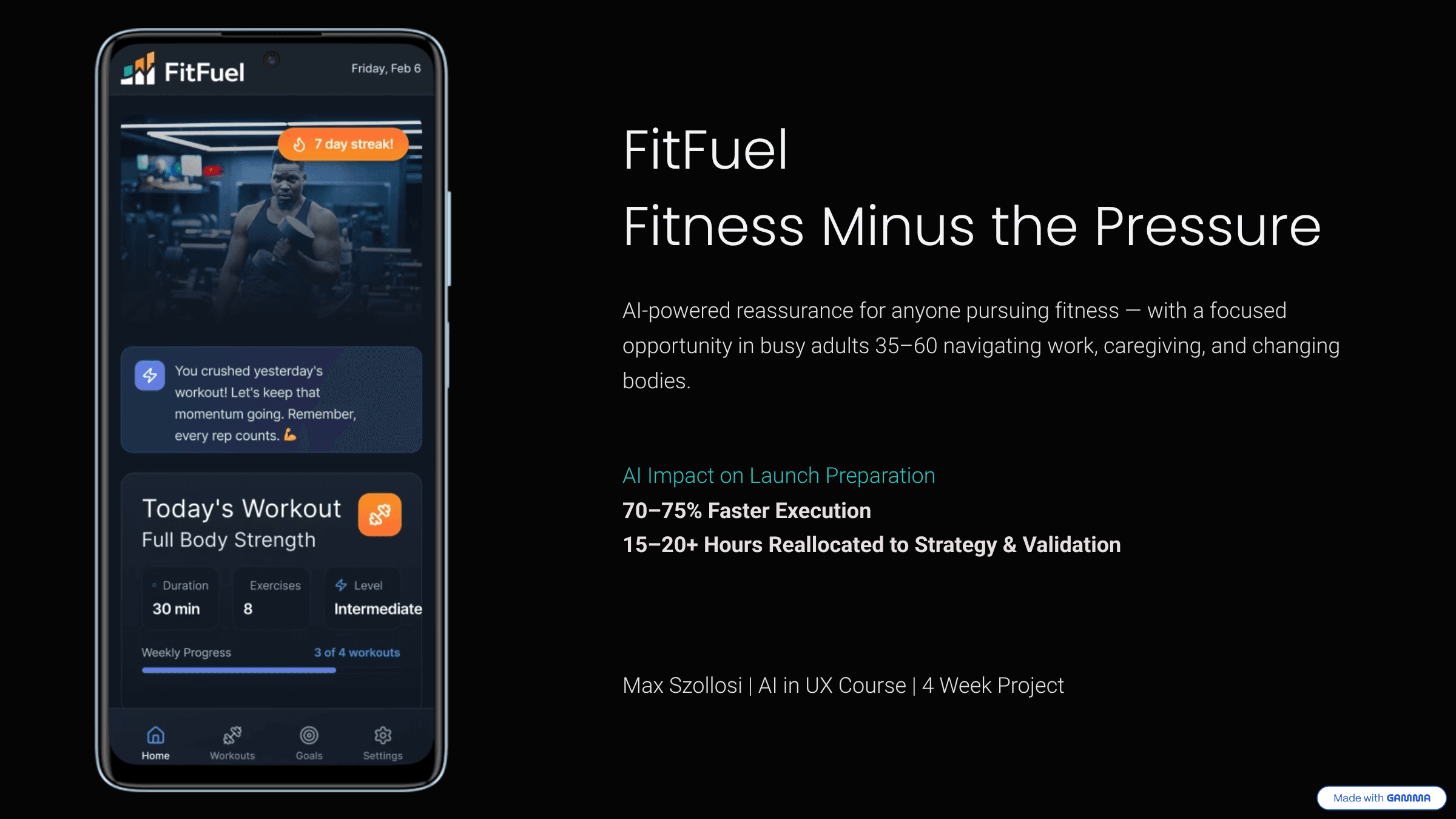
AI Cut 75% of UX Execution Time.
Here’s What That Actually Changed.
AI Cut 75% of UX Execution Time.
Here’s What That Actually Changed.
AI Cut 75% of UX Execution Time.
Here’s What That Actually Changed.
A four-week AI-assisted product sprint exploring how artificial intelligence compresses UX execution and what guardrails are required to use it responsibly.
A four-week AI-assisted product sprint exploring how artificial intelligence compresses UX execution and what guardrails are required to use it responsibly.
A four-week AI-assisted product sprint exploring how artificial intelligence compresses UX execution and what guardrails are required to use it responsibly.
AI is changing design workflows faster than most teams can keep up.
4-Week Sprint | AI-Assisted UX Workflow | 40 Hours Reclaimed
AI is changing design workflows faster than most teams can keep up.
4-Week Sprint | AI-Assisted UX Workflow | 40 Hours Reclaimed
AI is changing design workflows faster than most teams can keep up.
4-Week Sprint | AI-Assisted UX Workflow | 40 Hours Reclaimed
I ran a four-week AI-assisted sprint around a structured fitness app concept called FitFuel. The sprint began as part of an AI-focused UX program, but I treated it as a controlled experiment to understand how AI actually impacts a real design workflow.
I ran a four-week AI-assisted sprint around a structured fitness app concept called FitFuel. The sprint began as part of an AI-focused UX program, but I treated it as a controlled experiment to understand how AI actually impacts a real design workflow.
What This Experiment Explored
• How AI compresses UX execution time
• Where AI outputs become unreliable or biased
• What operational guardrails are required for responsible use
What This Experiment Explored
• How AI compresses UX execution time
• Where AI outputs become unreliable or biased
• What operational guardrails are required for responsible use
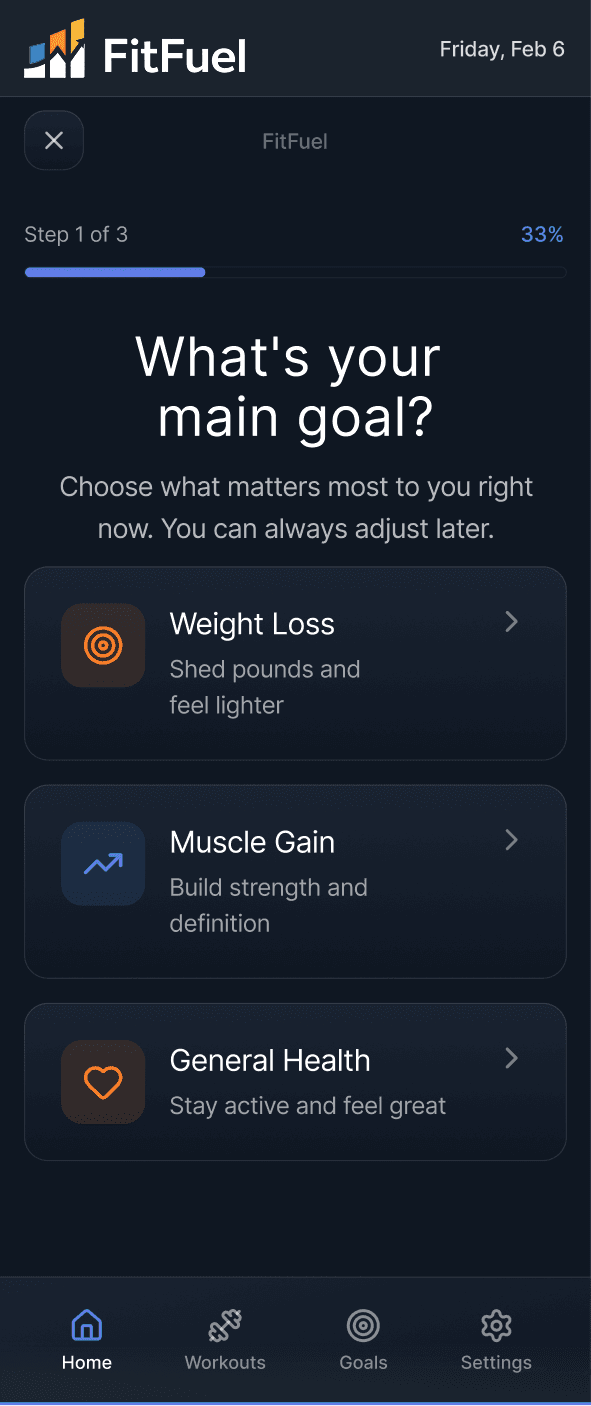
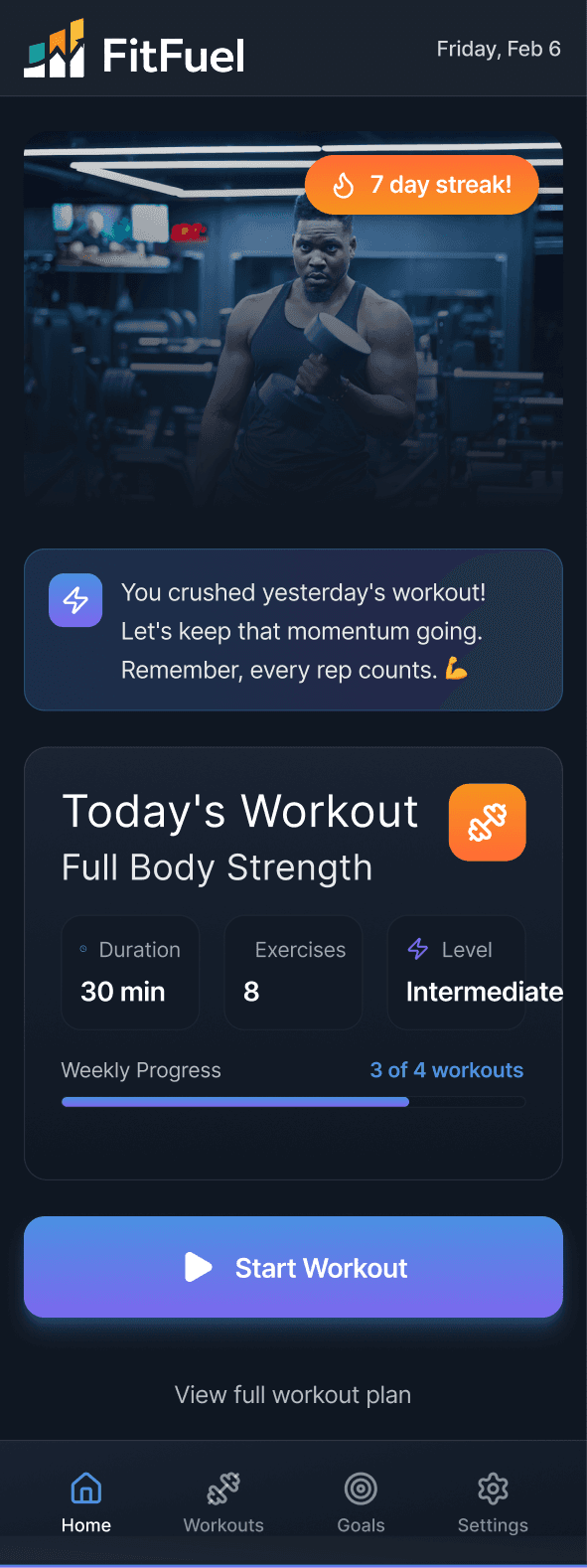
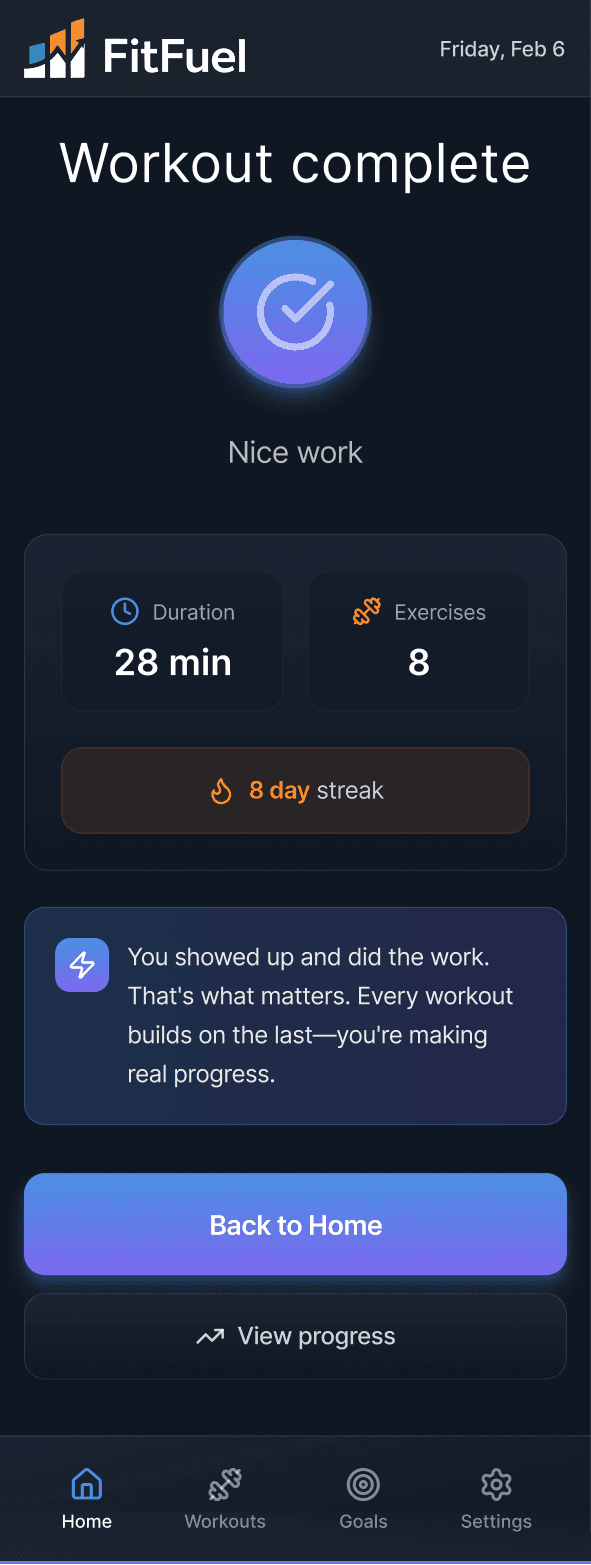
FitFuel concept prototype focused on adaptive pacing and confidence-first progress.
What I Designed During the Sprint
What I Designed During the Sprint
What I Designed During the Sprint
The sprint focused on designing:
• A goal-based onboarding flow
• A personalized workout dashboard
• A confidence-based progress metric
• Retention nudges aligned to a “fitness without pressure” positioning
• A lightweight investor narrative and slide deck
The sprint focused on designing:
• A goal-based onboarding flow
• A personalized workout dashboard
• A confidence-based progress metric
• Retention nudges aligned to a “fitness without pressure” positioning
• A lightweight investor narrative and slide deck
Competitive research, personas, prototyping, go-to-market planning, investor narrative, and launch assets were all produced during the sprint.
Competitive research, personas, prototyping, go-to-market planning, investor narrative, and launch assets were all produced during the sprint.
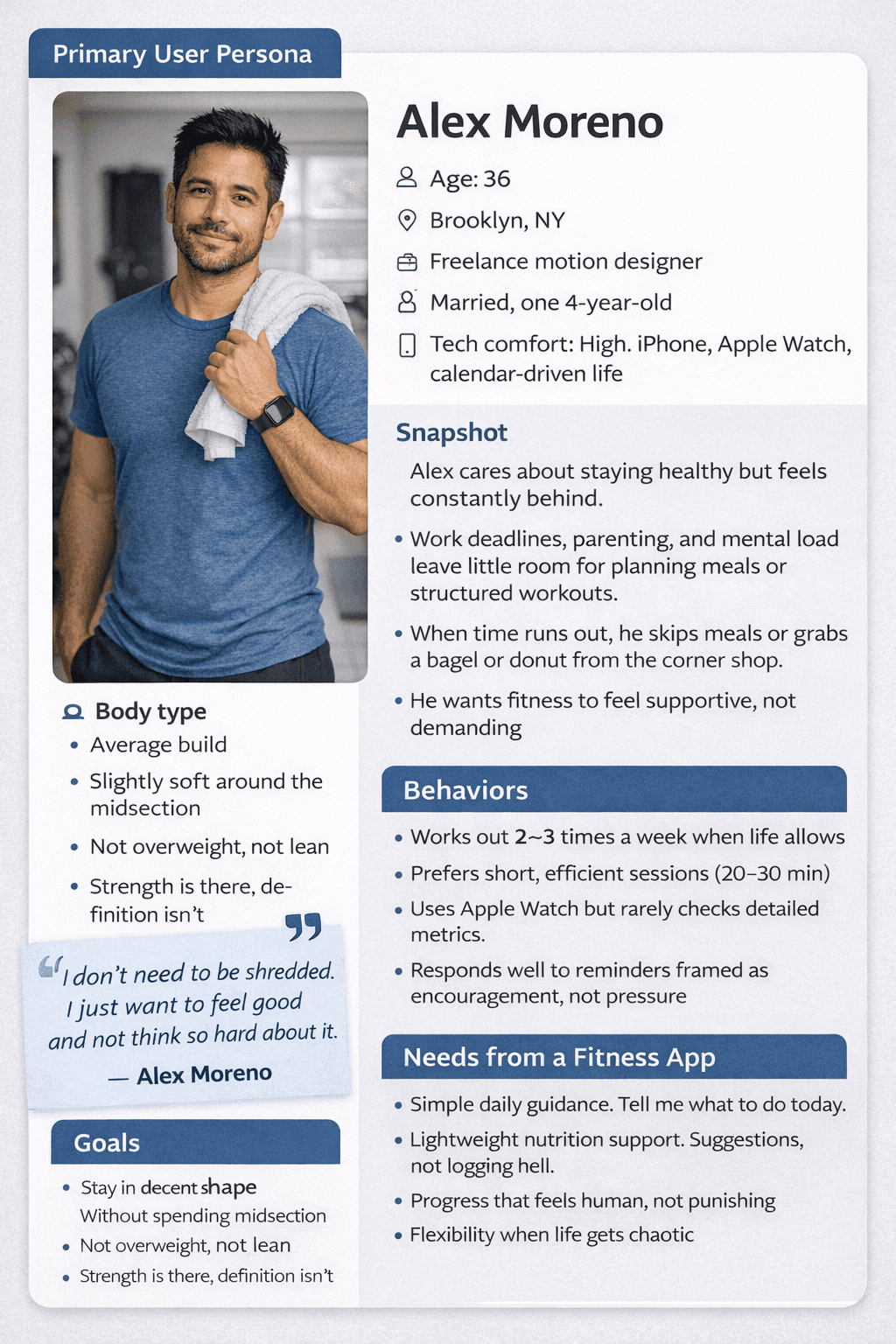
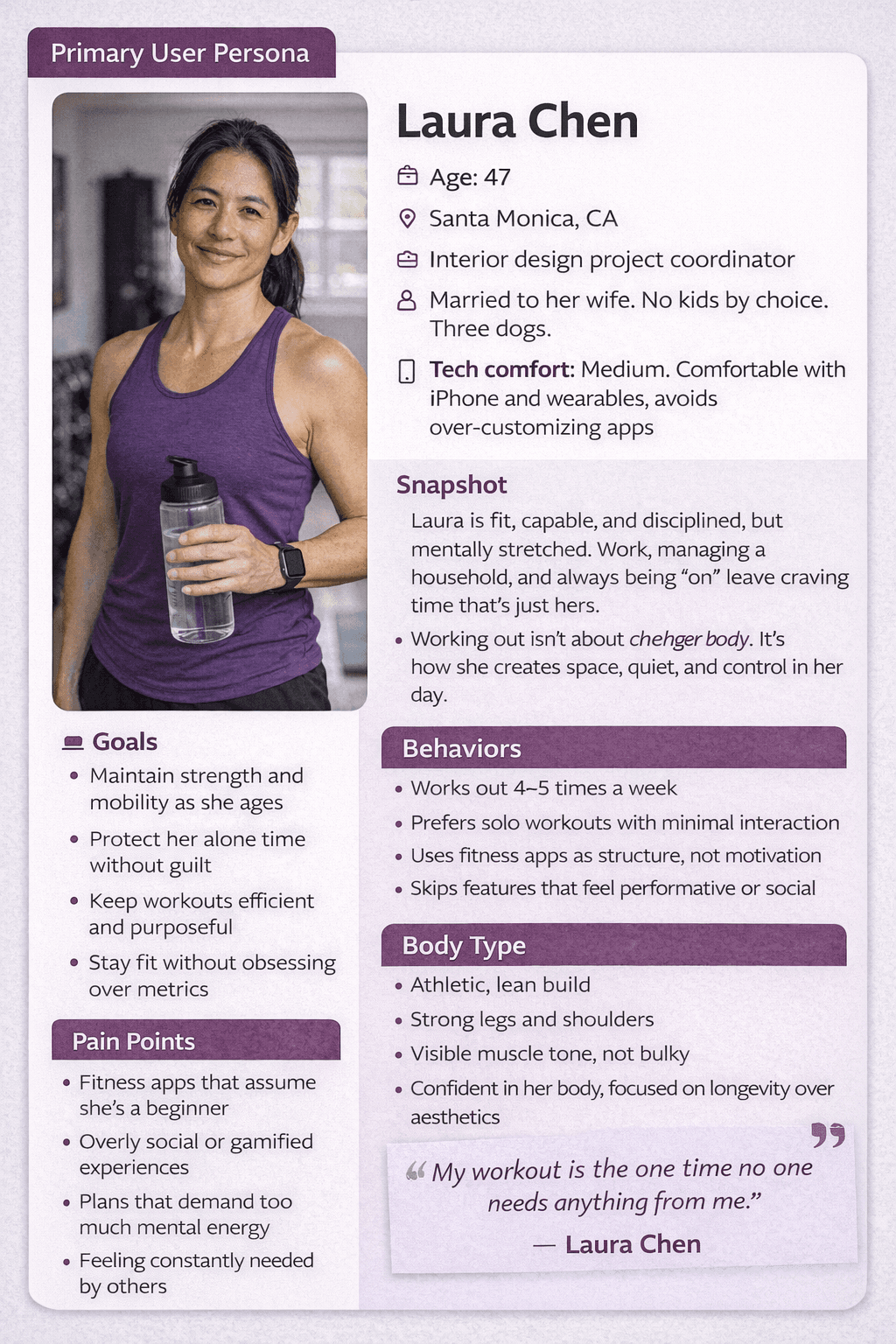
Primary user persona synthesized from research clustering and behavioral pattern analysis.
AI compressed nearly every structured part of the workflow by roughly 70–75%. Across research synthesis, strategy iteration, pitch development, and visual asset creation, I reclaimed approximately 40 hours of execution time.
I estimated the time savings by comparing the AI-assisted execution time against similar manual deliverables I’ve completed in previous projects.
And I was honestly impressed.
AI compressed nearly every structured part of the workflow by roughly 70–75%. Across research synthesis, strategy iteration, pitch development, and visual asset creation, I reclaimed approximately 40 hours of execution time.
I estimated the time savings by comparing the AI-assisted execution time against similar manual deliverables I’ve completed in previous projects.
And I was honestly impressed.
“It felt like leverage.”
“It felt like leverage.”
“It felt like leverage.”
Blank-page paralysis disappeared. Research clustering that normally drains an afternoon happened in minutes. Drafting a 10-slide investor narrative went from overwhelming to structured almost instantly.
That’s when I realized something important.
AI is powerful.
That’s why it’s both dangerous and exciting.
Because speed doesn’t just accelerate output.
It accelerates impact.
Blank-page paralysis disappeared. Research clustering that normally drains an afternoon happened in minutes. Drafting a 10-slide investor narrative went from overwhelming to structured almost instantly.
That’s when I realized something important.
AI is powerful.
That’s why it’s both dangerous and exciting.
Because speed doesn’t just accelerate output.
It accelerates impact.
Failure Points in an AI-Accelerated Workflow
Failure Points in an AI-Accelerated Workflow
Failure Points in an AI-Accelerated Workflow
AI outputs feel confident.
That’s dangerous.
AI outputs feel confident.
That’s dangerous.
Conflicting Market Data
Conflicting Market Data
Conflicting Market Data
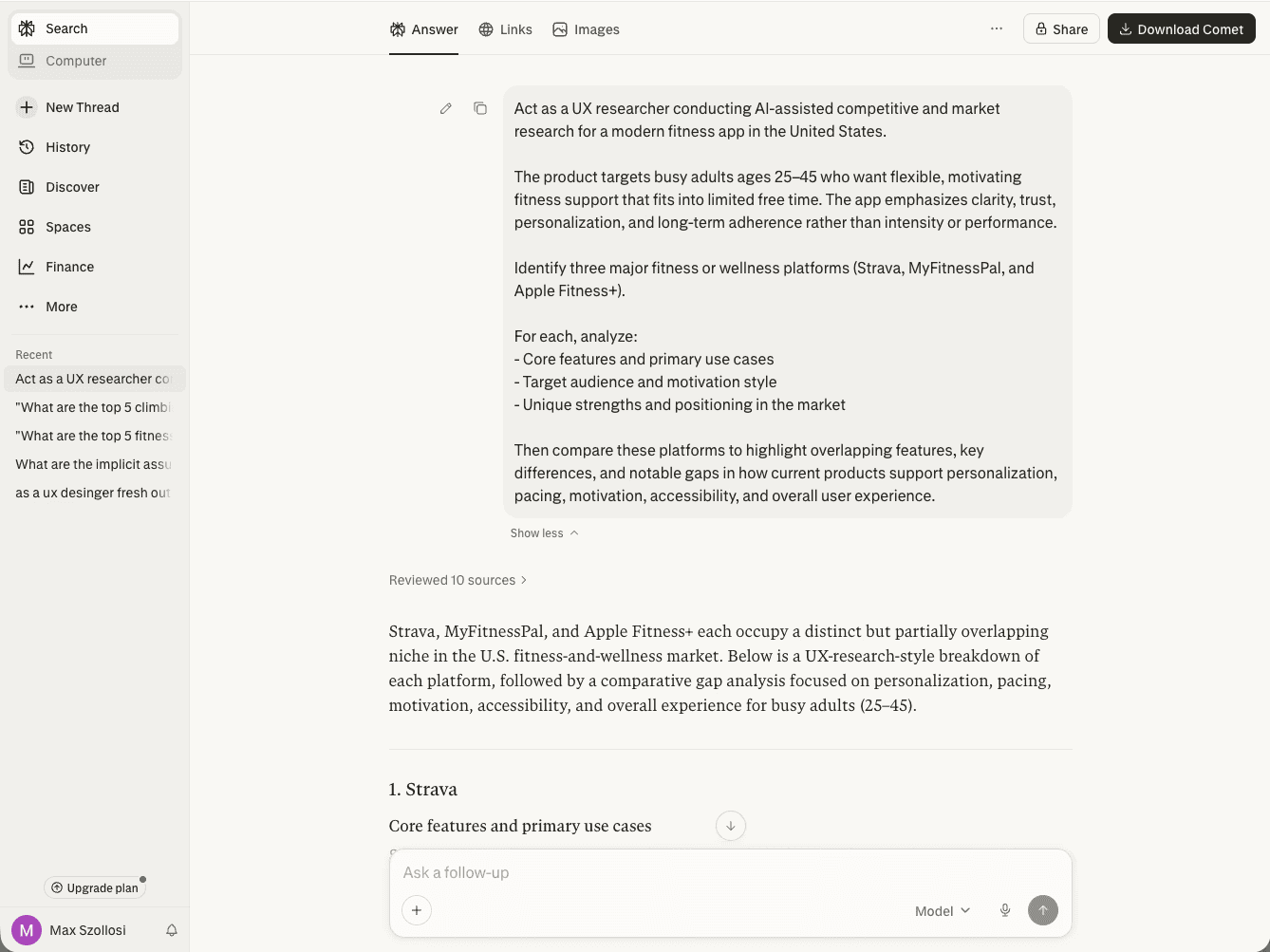
Perplexity - Research Phase
AI surfaced multiple market reports with different valuations and growth rates. None were obviously fake, but they weren’t aligned.
At one point, I caught a statistic that looked clean and authoritative. It came from Reddit. Not a verified industry report. Just someone’s opinion repeated confidently.
If I hadn’t double-checked, it would have made it into a polished investor slide.
AI doesn’t just make mistakes.
It makes confident mistakes.
(Those confident fabrications are often called hallucinations. Outputs that sound factual but aren’t properly verified.)
Operational Fix:
I began manually verifying every cited source before including it in any deliverable. I also adjusted prompts to explicitly exclude opinion-based platforms like Reddit for market sizing and financial projections. Tools like Perplexity and Scholar AI were especially helpful because they surfaced verifiable sources with citations before synthesis.
AI summaries became starting points, not final answers.
AI surfaced multiple market reports with different valuations and growth rates. None were obviously fake, but they weren’t aligned.
At one point, I caught a statistic that looked clean and authoritative. It came from Reddit. Not a verified industry report. Just someone’s opinion repeated confidently.
If I hadn’t double-checked, it would have made it into a polished investor slide.
AI doesn’t just make mistakes.
It makes confident mistakes.
(Those confident fabrications are often called hallucinations. Outputs that sound factual but aren’t properly verified.)
Operational Fix:
I began manually verifying every cited source before including it in any deliverable. I also adjusted prompts to explicitly exclude opinion-based platforms like Reddit for market sizing and financial projections. Tools like Perplexity and Scholar AI were especially helpful because they surfaced verifiable sources with citations before synthesis.
AI summaries became starting points, not final answers.
Bias in Representation
Bias in Representation
Bias in Representation
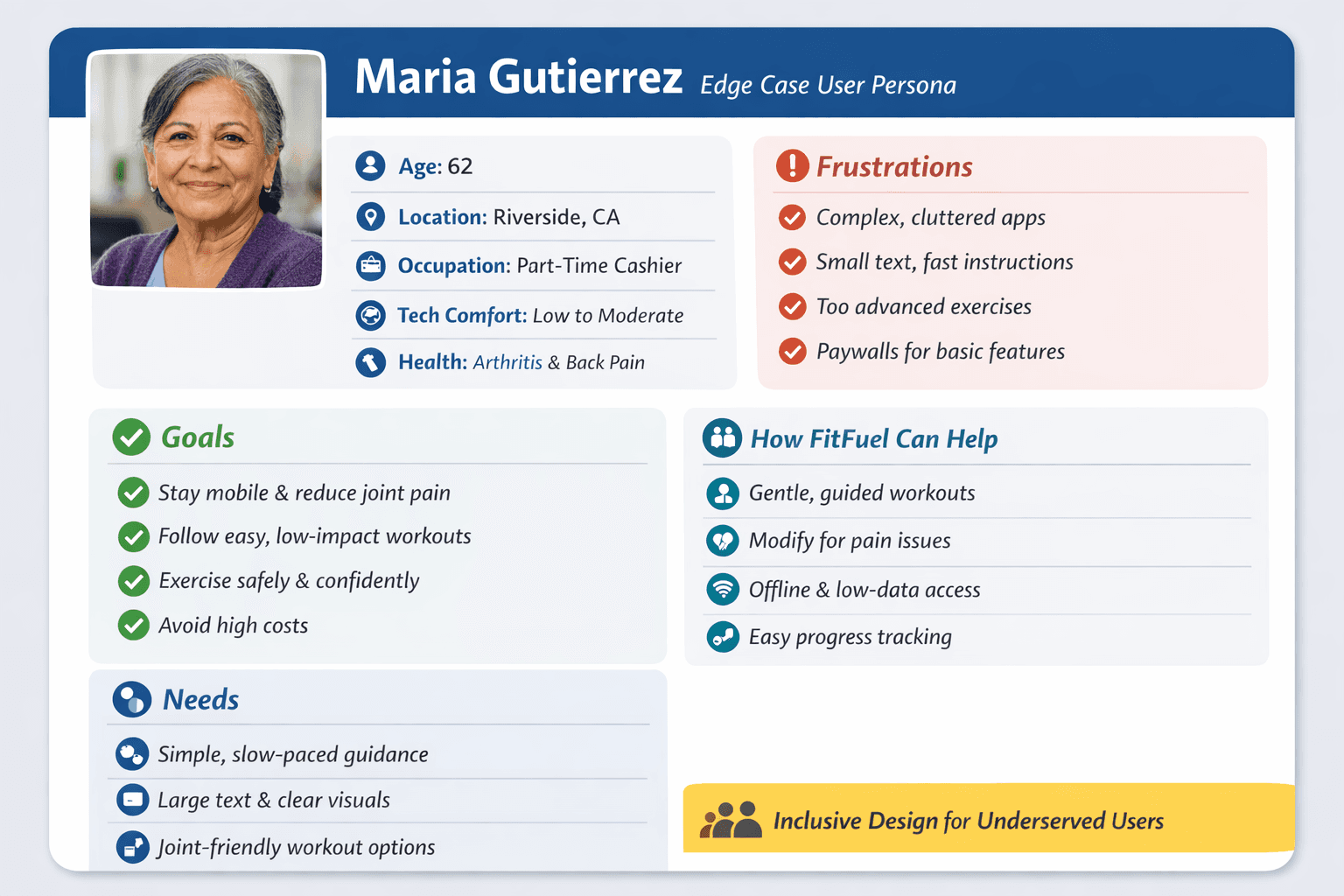
Early generated imagery leaned heavily toward able-bodied, conventionally fit individuals. Disability representation was missing. Ethnic diversity was narrow. Body types were repetitive.
Roughly 25% of AI-generated imagery required regeneration after deliberate review.
AI optimizes for statistical averages. Without intervention, those averages narrow inclusion.
Operational Fix:
I began explicitly instructing image-generation tools to include visible disabilities, broader body types, and diverse ethnic representation rather than relying on defaults. Specificity in prompts directly improved representation quality.
Early generated imagery leaned heavily toward able-bodied, conventionally fit individuals. Disability representation was missing. Ethnic diversity was narrow. Body types were repetitive.
Roughly 25% of AI-generated imagery required regeneration after deliberate review.
AI optimizes for statistical averages. Without intervention, those averages narrow inclusion.
Operational Fix:
I began explicitly instructing image-generation tools to include visible disabilities, broader body types, and diverse ethnic representation rather than relying on defaults. Specificity in prompts directly improved representation quality.
Clean-Looking but Fragile Metrics
Clean-Looking but Fragile Metrics
Clean-Looking but Fragile Metrics
At one point, a formatting issue inflated an engagement projection into something unrealistic.
It looked polished. It looked legitimate. It was wrong.
Speed makes it easier to move forward before resolving inconsistencies.
Operational Fix:
I required numerical outputs to be restated step-by-step before accepting projections into slides. Slowing down the math prevented polished but fragile metrics from slipping through.
At one point, a formatting issue inflated an engagement projection into something unrealistic.
It looked polished. It looked legitimate. It was wrong.
Speed makes it easier to move forward before resolving inconsistencies.
Operational Fix:
I required numerical outputs to be restated step-by-step before accepting projections into slides. Slowing down the math prevented polished but fragile metrics from slipping through.
The Hidden Cost of AI
The Hidden Cost of AI
The Hidden Cost of AI
AI saved time.
It can save money.
But it introduced operational cost and new responsibility.
The first prompt was rarely the final prompt. I had to refine instructions, define constraints, push for deeper reasoning, and force the model to label assumptions.
(That iterative structuring of prompts within the LLM is called meta-prompting.)
The prototype required roughly 30+ structured prompts and approximately 1,200 Figma Make credits.
At one point, I ran low on credits while refining layouts. Iteration slowed, and I had to decide whether to regenerate visuals or preserve credits for structural improvements. That constraint forced more precision.
Concepts drifted across tools. Tone shifted subtly. KPIs evolved. Visual direction moved. Keeping everything aligned required active oversight.
Subscriptions stack up.
Credits are finite.
And if you’re working with sensitive company data, enterprise-level access isn’t optional.
AI can reduce execution cost.
But without structure, it can increase operational overhead.
The efficiency is real.
So is the responsibility.
None of this made me skeptical of AI. If anything, it made me more convinced it belongs in modern workflows. It just has to be governed.
AI saved time.
It can save money.
But it introduced operational cost and new responsibility.
The first prompt was rarely the final prompt. I had to refine instructions, define constraints, push for deeper reasoning, and force the model to label assumptions.
(That iterative structuring of prompts within the LLM is called meta-prompting.)
The prototype required roughly 30+ structured prompts and approximately 1,200 Figma Make credits.
At one point, I ran low on credits while refining layouts. Iteration slowed, and I had to decide whether to regenerate visuals or preserve credits for structural improvements. That constraint forced more precision.
Concepts drifted across tools. Tone shifted subtly. KPIs evolved. Visual direction moved. Keeping everything aligned required active oversight.
Subscriptions stack up.
Credits are finite.
And if you’re working with sensitive company data, enterprise-level access isn’t optional.
AI can reduce execution cost.
But without structure, it can increase operational overhead.
The efficiency is real.
So is the responsibility.
None of this made me skeptical of AI. If anything, it made me more convinced it belongs in modern workflows. It just has to be governed.
How I Built an AI Workflow Stack
How I Built an AI Workflow Stack
How I Built an AI Workflow Stack
Not all AI tools behave the same, tool selection affects outcome quality. During the sprint, I started organizing tools by the phase of the workflow they supported. This revealed how much output quality depends on matching the right tool to the right stage of the design process.
Not all AI tools behave the same, tool selection affects outcome quality. During the sprint, I started organizing tools by the phase of the workflow they supported. This revealed how much output quality depends on matching the right tool to the right stage of the design process.
Research
Research
Research
ChatGPT — Strong for synthesis and prompt iteration, requires manual source verification
Perplexity — Useful for surfacing cited sources quickly
Claude — Helpful for longer-form reasoning drafts
ChatGPT — Strong for synthesis and prompt iteration, requires manual source verification
Perplexity — Useful for surfacing cited sources quickly
Claude — Helpful for longer-form reasoning drafts
Prototyping
Prototyping
Prototyping
Figma Make — Rapid layout scaffolding, credit-sensitive
Stitch — Useful for early structure exploration
Uizard — Fast concept exploration, less precise
Figma Make — Rapid layout scaffolding, credit-sensitive
Stitch — Useful for early structure exploration
Uizard — Fast concept exploration, less precise
Visual Generation
Visual Generation
Visual Generation
Firefly — Strong for brand-aligned assets
DALL·E — Flexible concept generation
Midjourney — High-quality visual exploration, requires prompt precision
Firefly — Strong for brand-aligned assets
DALL·E — Flexible concept generation
Midjourney — High-quality visual exploration, requires prompt precision
Narrative
Narrative
Narrative
Gamma — Quickly structured investor narrative and slide decks
Gamma — Quickly structured investor narrative and slide decks
Using the wrong tool for the wrong phase created shallow output. The quality of the output was directly tied to the clarity of the input.
AI isn’t one tool. It's an ecosystem.
Over time this became less about individual tools and more about building an AI stack — a set of tools selected for different phases of the workflow. That stack will look different for every team depending on their process, constraints, and risk tolerance.
Early on, I experimented with a wide range of AI tools. But as the sprint progressed, the stack narrowed to a small set of tools that consistently produced reliable output.
Core stack used in execution:
• Perplexity → research + source validation
• ChatGPT → synthesis, iteration, refinement
• Figma Make → layout + prototyping
• Firefly / DALL·E → visual assets
• Gamma → narrative + deck structure
The problem wasn’t tool capability. It was context switching.
Using too many tools created shallow output. The quality improved when each tool had a clear role in the workflow.
The goal wasn’t to use more tools.
It was to build a system where each tool had a defined job.
Using the wrong tool for the wrong phase created shallow output. The quality of the output was directly tied to the clarity of the input.
AI isn’t one tool. It's an ecosystem.
Over time this became less about individual tools and more about building an AI stack — a set of tools selected for different phases of the workflow. That stack will look different for every team depending on their process, constraints, and risk tolerance.
Early on, I experimented with a wide range of AI tools. But as the sprint progressed, the stack narrowed to a small set of tools that consistently produced reliable output.
Core stack used in execution:
• Perplexity → research + source validation
• ChatGPT → synthesis, iteration, refinement
• Figma Make → layout + prototyping
• Firefly / DALL·E → visual assets
• Gamma → narrative + deck structure
The problem wasn’t tool capability. It was context switching.
Using too many tools created shallow output. The quality improved when each tool had a clear role in the workflow.
The goal wasn’t to use more tools.
It was to build a system where each tool had a defined job.
Guardrails in an AI-Accelerated Workflow
Guardrails in an AI-Accelerated Workflow
Guardrails in an AI-Accelerated Workflow
Once I saw how easily AI could generate plausible but flawed output, I stopped treating it like a helper and started treating it like a system that needed constraints.
I built guardrails.
AI Tag → AI Cluster → Human Prioritize → Implement
AI handled grouping. Humans handled decisions.
Quantitative claims were cross-checked. Assumptions were labeled as projections. Escalation rules were defined.
AI accelerated production. Human oversight protected trust.
There must always be a human in the loop.
Not as a backup, but as the decision-maker.
AI can generate. It can suggest. It can accelerate. But it cannot be accountable.
Once I saw how easily AI could generate plausible but flawed output, I stopped treating it like a helper and started treating it like a system that needed constraints.
I built guardrails.
AI Tag → AI Cluster → Human Prioritize → Implement
AI handled grouping. Humans handled decisions.
Quantitative claims were cross-checked. Assumptions were labeled as projections. Escalation rules were defined.
AI accelerated production. Human oversight protected trust.
There must always be a human in the loop.
Not as a backup, but as the decision-maker.
AI can generate. It can suggest. It can accelerate. But it cannot be accountable.
The Shift
The Shift
The Shift
Over 40 hours were reclaimed in four weeks.
Over 40 hours were reclaimed in four weeks.
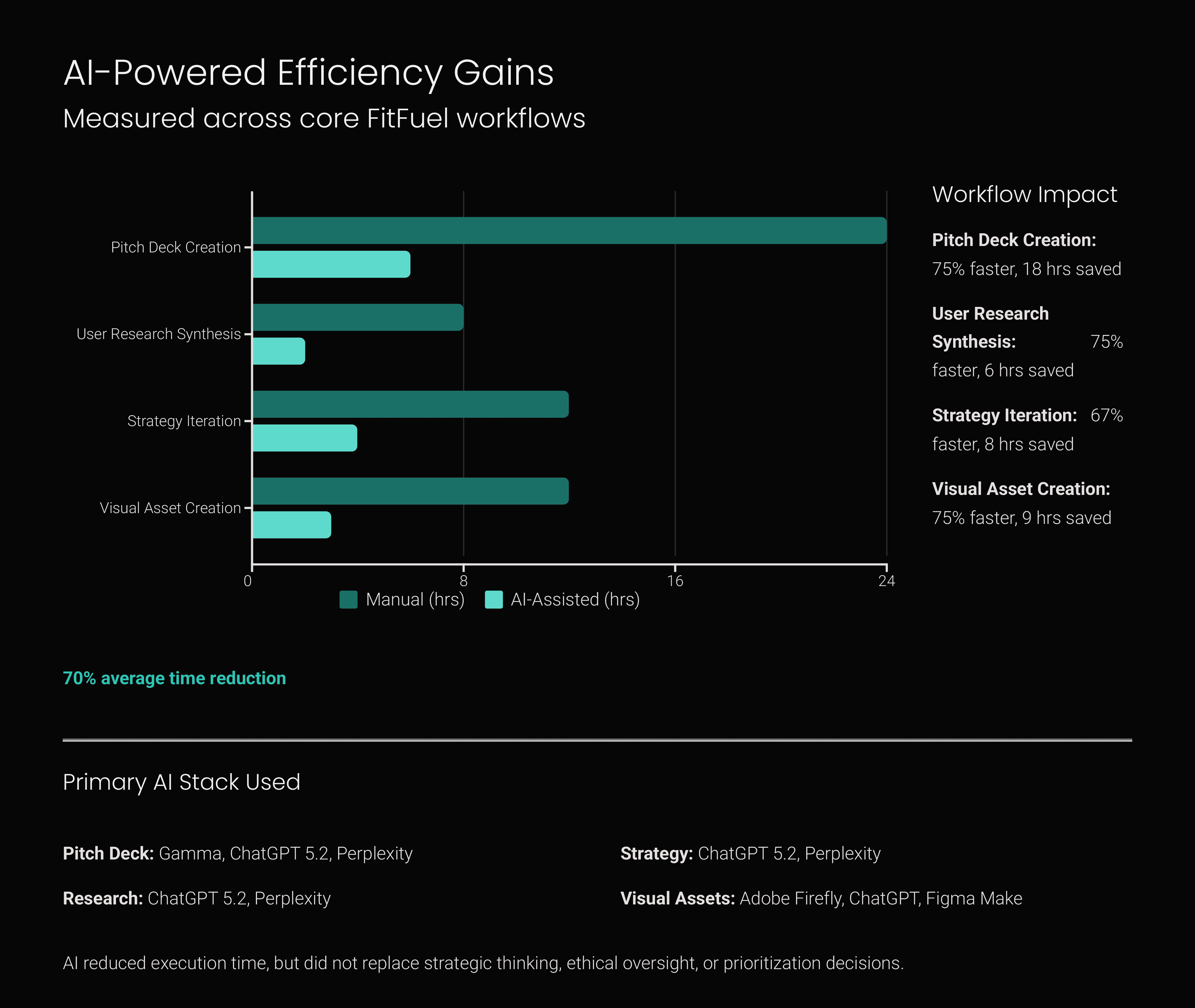
Time estimates based on comparison with similar manual deliverables from previous projects.
But the real shift wasn’t cost savings.
It was creative bandwidth.
Less time formatting. More time deciding.
Less time clustering. More time interpreting.
Less time drafting. More time refining.
AI didn’t eliminate hard decisions.
It gave me more space to make better ones.
But the real shift wasn’t cost savings.
It was creative bandwidth.
Less time formatting. More time deciding.
Less time clustering. More time interpreting.
Less time drafting. More time refining.
AI didn’t eliminate hard decisions.
It gave me more space to make better ones.
AI didn’t make decisions for me.
It forced me to make better ones faster.
AI didn’t make decisions for me.
It forced me to make better ones faster.
AI didn’t make decisions for me.
It forced me to make better ones faster.
What This Means for Product Teams
What This Means for Product Teams
What This Means for Product Teams
AI doesn't just accelerate execution. It changes how design teams allocate time and attention across the product development process.
In this sprint, the biggest gains came from removing repetitive cognitive work like research clustering, early drafting, and documentation. The result wasn’t fewer design decisions — it was more time to make better ones.
AI doesn't just accelerate execution. It changes how design teams allocate time and attention across the product development process.
In this sprint, the biggest gains came from removing repetitive cognitive work like research clustering, early drafting, and documentation. The result wasn’t fewer design decisions — it was more time to make better ones.
If I Joined Your Team Tomorrow
If I Joined Your Team Tomorrow
If I Joined Your Team Tomorrow
I wouldn’t start by pitching tools.
I would start by identifying where repetitive execution is slowing the team down. Research synthesis, feedback clustering, internal documentation, and first-pass drafting.
I would introduce AI there first. Not to replace thinking, but to protect it.
I believe AI should be integrated into modern UX workflows. It frees up creative energy, increases iteration, and reduces repetitive execution.
But there must always be a human in the loop. Not as a backup, but as the decision-maker.
I wouldn’t start by pitching tools.
I would start by identifying where repetitive execution is slowing the team down. Research synthesis, feedback clustering, internal documentation, and first-pass drafting.
I would introduce AI there first. Not to replace thinking, but to protect it.
I believe AI should be integrated into modern UX workflows. It frees up creative energy, increases iteration, and reduces repetitive execution.
But there must always be a human in the loop. Not as a backup, but as the decision-maker.
What This Experiment Reinforced
What This Experiment Reinforced
What This Experiment Reinforced
AI is evolving quickly. If you’re not experimenting with it inside your workflow, you may already be behind. But if you’re using it casually, you’re increasing risk without realizing it.
AI won’t replace designers, but it will expose who understands process and who doesn’t.
It rewards clarity and punishes carelessness. It accelerates discipline and magnifies oversight.
The question isn’t whether AI belongs in modern UX workflows. It does.
The real question is whether we’re intentional enough to use it well.
That’s the real experiment.
And it’s just getting started.
-Max Szollosi
3/11/2026
AI is evolving quickly. If you’re not experimenting with it inside your workflow, you may already be behind. But if you’re using it casually, you’re increasing risk without realizing it.
AI won’t replace designers, but it will expose who understands process and who doesn’t.
It rewards clarity and punishes carelessness. It accelerates discipline and magnifies oversight.
The question isn’t whether AI belongs in modern UX workflows. It does.
The real question is whether we’re intentional enough to use it well.
That’s the real experiment.
And it’s just getting started.
-Max Szollosi
3/11/2026
Deliverable - GTM
Deliverable - GTM
Deliverable - GTM