

MAX SCORE
Solo UX/UI Designer + Developer
Amazfit Active 2 · Zepp OS
Keeping
Ping-Pong Moving
Keeping
Ping-Pong Moving
Designing a smartwatch scorekeeper that helps players track points without interrupting play.
Designing a smartwatch scorekeeper that helps players track points without interrupting play.
2 weeks
2 weeks
Built and shipped
466 x 466
466 x 466
Round watch Screen
52 countries
52 countries
Downloads so far
Zepp Store
Zepp Store
Live product
Keeping
Ping-Pong Moving
Designing a smartwatch scorekeeper that helps players track points without interrupting play.
MAX SCORE
Solo UX/UI Designer + Developer
Amazfit Active 2 · Zepp OS
2 weeks
Built and shipped
466 x 466
Round watch Screen
52 countries
Downloads so far
Zepp Store
Live product

Keeping score
should not interrupt the game.
Keeping score should not interrupt the game.
At my rock climbing gym, people would get into competitive ping-pong games and lose track of the score because they were focused on playing.
The problem was not that players needed a complex scoring system. They needed a quick way to track points without breaking the flow of the game.
At my rock climbing gym, people would get into competitive ping-pong games and lose track of the score because they were focused on playing.
The problem was not that players needed a complex scoring system. They needed a quick way to track points without breaking the flow of the game.
PROBLEM SNAPSHOT
1
Play
hard
2
Lose
track
3
Pause
match
4
Confirm
score
Lost momentum
Score confusion
Mid-game friction
Observed behavior
Players lost track of the score mid-game.
Why it mattered
Stopping to remember the score interrupted momentum and created friction
PROBLEM SNAPSHOT
1
Play
hard
2
Lose
track
3
Pause
match
4
Confirm
score
Lost momentum
Score confusion
Mid-game friction
Keeping score should not interrupt the game.
At my rock climbing gym, people would get into competitive ping-pong games and lose track of the score because they were focused on playing.
The problem was not that players needed a complex scoring system. They needed a quick way to track points without breaking the flow of the game.
PROBLEM SNAPSHOT
1
Play
hard
2
Lose
track
3
Pause
match
4
Confirm
score
Lost momentum
Score confusion
Mid-game friction
Observed behavior
Players lost track of the score mid-game.
Why it mattered
Stopping to remember the score interrupted momentum and created friction
Keeping score
should not interrupt the game.
At my rock climbing gym, people would get into competitive ping-pong games and lose track of the score because they were focused on playing.
The problem was not that players needed a complex scoring system. They needed a quick way to track points without breaking the flow of the game.
PROBLEM SNAPSHOT
1
Play
hard
2
Lose
track
3
Pause
match
4
Confirm
score
Lost momentum
Score confusion
Mid-game friction
Observed behavior
Players lost track of the score mid-game.
Why it mattered
Stopping to remember the score interrupted momentum and created friction
PROBLEM SNAPSHOT
1
Play
hard
2
Lose
track
3
Pause
match
4
Confirm
score
Lost momentum
Score confusion
Mid-game friction
Keeping score should not interrupt the game.
At my rock climbing gym, people would get into competitive ping-pong games and lose track of the score because they were focused on playing.
The problem was not that players needed a complex scoring system. They needed a quick way to track points without breaking the flow of the game.
PROBLEM SNAPSHOT
1
Play
hard
2
Lose
track
3
Pause
match
4
Confirm
score
Lost momentum
Score confusion
Mid-game friction
Observed behavior
Players lost track of the score mid-game.
Why it mattered
Stopping to remember the score interrupted momentum and created friction

INSIGHT SNAPSHOT
1
Tap
2
Glance
3
Continue
Fast
Glanceable
Low Friction
The scorekeeper needed to disappear into the match.
The scorekeeper needed to disappear into the match.
After talking with local players, the clearest need was speed. Players wanted to add points, check the score, and fix mistakes without feeling like they were managing an app.
That shifted the design goal from “build a scorekeeper” to “make scorekeeping feel almost invisible.”
After talking with local players, the clearest need was speed. Players wanted to add points, check the score, and fix mistakes without feeling like they were managing an app.
That shifted the design goal from “build a scorekeeper” to “make scorekeeping feel almost invisible.”
INSIGHT SNAPSHOT
1
Tap
2
Glance
3
Continue
Fast
Glanceable
Low Friction
Key Insight
Users did not need more features. They needed fewer distractions.
Why it mattered
Score confusion interrupted play and made the experience less fun.
The scorekeeper needed to disappear into the match.
After talking with local players, the clearest need was speed. Players wanted to add points, check the score, and fix mistakes without feeling like they were managing an app.
That shifted the design goal from “build a scorekeeper” to “make scorekeeping feel almost invisible.”
INSIGHT SNAPSHOT
1
Tap
2
Glance
3
Continue
Fast
Glanceable
Low Friction
Key Insight
Users did not need more features. They needed fewer distractions.
Why it mattered
Score confusion interrupted play and made the experience less fun.
INSIGHT SNAPSHOT
1
Tap
2
Glance
3
Continue
Fast
Glanceable
Low Friction
The scorekeeper needed to disappear into the match.
After talking with local players, the clearest need was speed. Players wanted to add points, check the score, and fix mistakes without feeling like they were managing an app.
That shifted the design goal from “build a scorekeeper” to “make scorekeeping feel almost invisible.”
INSIGHT SNAPSHOT
1
Tap
2
Glance
3
Continue
Fast
Glanceable
Low Friction
Key Insight
Users did not need more features. They needed fewer distractions.
Why it mattered
Score confusion interrupted play and made the experience less fun.
The scorekeeper needed to disappear into the match.
After talking with local players, the clearest need was speed. Players wanted to add points, check the score, and fix mistakes without feeling like they were managing an app.
That shifted the design goal from “build a scorekeeper” to “make scorekeeping feel almost invisible.”
INSIGHT SNAPSHOT
1
Tap
2
Glance
3
Continue
Fast
Glanceable
Low Friction
Key Insight
Users did not need more features. They needed fewer distractions.
Why it mattered
Score confusion interrupted play and made the experience less fun.

A tiny screen forced every decision to matter.
A tiny screen forced every decision to matter.
Designing for a 466 × 466 round screen meant every tap target, label, animation, and state had to earn its place.
Designing for a 466 × 466 round screen meant every tap target, label, animation, and state had to earn its place.

Interaction
Players needed to score quickly mid-game
Technical
Zepp OS limits, small file size, haptic behavior, and watch performance
UX tradeoff
Remove anything slowing down scoring or making the interface hard to read
Interaction
Players needed to score quickly mid-game
Technical
Zepp OS limits, small file size, haptic behavior, and watch performance
UX tradeoff
Remove anything slowing down scoring or making the interface hard to read
A tiny screen forced every decision to matter.
Designing for a 466 × 466 round screen meant every tap target, label, animation, and state had to earn its place.
Interaction
Players needed to score quickly mid-game
Technical
Zepp OS limits, small file size, haptic behavior, and watch performance
UX tradeoff
Remove anything slowing down scoring or making the interface hard to read
A tiny screen forced every decision to matter.
Designing for a 466 × 466 round screen meant every tap target, label, animation, and state had to earn its place.
Interaction
Players needed to score quickly mid-game
Technical
Zepp OS limits, small file size, haptic behavior, and watch performance
UX tradeoff
Remove anything slowing down scoring or making the interface hard to read
Interaction
Players needed to score quickly mid-game
Technical
Zepp OS limits, small file size, haptic behavior, and watch performance
UX tradeoff
Remove anything slowing down scoring or making the interface hard to read
A tiny screen forced every decision to matter.
Designing for a 466 × 466 round screen meant every tap target, label, animation, and state had to earn its place.
Interaction
Players needed to score quickly mid-game
Technical
Zepp OS limits, small file size, haptic behavior, and watch performance
UX tradeoff
Remove anything slowing down scoring or making the interface hard to read

Three decisions shaped the final experience.
Three decisions shaped the final experience.
1.The scoreboard became the controller.
Instead of separating the score display from the scoring buttons, I made the main score areas large and tappable. This kept the interaction fast and reduced the amount of UI needed on a small screen.
Tradeoff: less room for extra controls, but a faster core action.
1.The scoreboard became the controller.
Instead of separating the score display from the scoring buttons, I made the main score areas large and tappable. This kept the interaction fast and reduced the amount of UI needed on a small screen.
Tradeoff: less room for extra controls, but a faster core action.
2.The app was simplified to three main screens.
The final flow focused on setup, scoring, and winner feedback. I avoided adding extra sports, settings, or secondary features so the app could stay lightweight and easy to use.
Tradeoff: fewer features, but a cleaner and more focused product.
2.The app was simplified to three main screens.
The final flow focused on setup, scoring, and winner feedback. I avoided adding extra sports, settings, or secondary features so the app could stay lightweight and easy to use.
Tradeoff: fewer features, but a cleaner and more focused product.
3.Game states had to be obvious at a glance.
Score, deuce, advantage, match progress, undo, and winner states all needed to be clear without making the player think.
Tradeoff: the interface had to stay simple while still handling real ping-pong scoring logic.
3.Game states had to be obvious at a glance.
Score, deuce, advantage, match progress, undo, and winner states all needed to be clear without making the player think.
Tradeoff: the interface had to stay simple while still handling real ping-pong scoring logic.
Three decisions shaped the final experience.
1.The scoreboard became the controller.
Instead of separating the score display from the scoring buttons, I made the main score areas large and tappable. This kept the interaction fast and reduced the amount of UI needed on a small screen.
Tradeoff: less room for extra controls, but a faster core action.
2.The app was simplified to three main screens.
The final flow focused on setup, scoring, and winner feedback. I avoided adding extra sports, settings, or secondary features so the app could stay lightweight and easy to use.
Tradeoff: fewer features, but a cleaner and more focused product.
3.Game states had to be obvious at a glance.
Score, deuce, advantage, match progress, undo, and winner states all needed to be clear without making the player think.
Tradeoff: the interface had to stay simple while still handling real ping-pong scoring logic.
Three decisions shaped the final experience.
1.The scoreboard became the controller.
Instead of separating the score display from the scoring buttons, I made the main score areas large and tappable. This kept the interaction fast and reduced the amount of UI needed on a small screen.
Tradeoff: less room for extra controls, but a faster core action.
2.The app was simplified to three main screens.
The final flow focused on setup, scoring, and winner feedback. I avoided adding extra sports, settings, or secondary features so the app could stay lightweight and easy to use.
Tradeoff: fewer features, but a cleaner and more focused product.
3.Game states had to be obvious at a glance.
Score, deuce, advantage, match progress, undo, and winner states all needed to be clear without making the player think.
Tradeoff: the interface had to stay simple while still handling real ping-pong scoring logic.
Three decisions shaped the final experience.
1.The scoreboard became the controller.
Instead of separating the score display from the scoring buttons, I made the main score areas large and tappable. This kept the interaction fast and reduced the amount of UI needed on a small screen.
Tradeoff: less room for extra controls, but a faster core action.
2.The app was simplified to three main screens.
The final flow focused on setup, scoring, and winner feedback. I avoided adding extra sports, settings, or secondary features so the app could stay lightweight and easy to use.
Tradeoff: fewer features, but a cleaner and more focused product.
3.Game states had to be obvious at a glance.
Score, deuce, advantage, match progress, undo, and winner states all needed to be clear without making the player think.
Tradeoff: the interface had to stay simple while still handling real ping-pong scoring logic.

AI accelerated the build.
Human judgment shaped the product.
AI accelerated the build.
Human judgment shaped the product.
Design → AI Translation → Build → Debug → Ship
Design → AI Translation → Build → Debug → Ship
Goal
Use AI to move faster from design concept to working smartwatch app while keeping product direction, UX decisions, and final quality in my control.
Goal
Use AI to move faster from design concept to working smartwatch app while keeping product direction, UX decisions, and final quality in my control.
Tools
Figma → UI direction (using figma helped tame the AI, Figma's AI was not used.)
ChatGPT → planning, design translation, and troubleshooting
Claude → early coding exploration (failed)
Codex → implementation and debugging
Zepp tools / Terminal → build and packaging
Tools
Figma → UI direction (using figma helped tame the AI, Figma's AI was not used.)
ChatGPT → planning, design translation, and troubleshooting
Claude → early coding exploration (failed)
Codex → implementation and debugging
Zepp tools / Terminal → build and packaging
Where AI helped
Translated design direction into code faster
Helped troubleshoot Zepp-specific implementation issues
Supported faster iteration between design, build, and testing
Where AI helped
Translated design direction into code faster
Helped troubleshoot Zepp-specific implementation issues
Supported faster iteration between design, build, and testing
Where I stayed in control
Defined the core product experience
Simplified the app to fit the watch constraints
Tested what felt usable on the actual device
Switched tools when the output was not good enough
Where I stayed in control
Defined the core product experience
Simplified the app to fit the watch constraints
Tested what felt usable on the actual device
Switched tools when the output was not good enough
RESULT
AI helped compress the process from idea to shipped app into 2 weeks, but the final product still depended on product judgment, testing, and iteration.
RESULT
AI helped compress the process from idea to shipped app into 2 weeks, but the final product still depended on product judgment, testing, and iteration.
AI accelerated the build.
Human judgment shaped the product.
Design → AI Translation → Build → Debug → Ship
Goal
Use AI to move faster from design concept to working smartwatch app while keeping product direction, UX decisions, and final quality in my control.
Tools
Figma → UI direction (using figma helped tame the AI, Figma's AI was not used.)
ChatGPT → planning, design translation, and troubleshooting
Claude → early coding exploration (failed)
Codex → implementation and debugging
Zepp tools / Terminal → build and packaging
Where AI helped
Translated design direction into code faster
Helped troubleshoot Zepp-specific implementation issues
Supported faster iteration between design, build, and testing
Where I stayed in control
Defined the core product experience
Simplified the app to fit the watch constraints
Tested what felt usable on the actual device
Switched tools when the output was not good enough
RESULT
AI helped compress the process from idea to shipped app into 2 weeks, but the final product still depended on product judgment, testing, and iteration.

The first version worked, but it did not feel good enough.
Early versions had UI issues. The layout did not fit the watch well, buttons felt too small, and haptic feedback fired more times than it should.
I made the interface larger, simplified the flow, improved readability, and refined the haptic behavior so each tap felt more intentional.
Before

Small controls,
poor screen fit, inconsistent feedback
After

Larger tap areas, cleaner layout, clearer scoring states,
tighter feedback
Still improving
The next update will preserve the score if the app is accidentally closed and expand support to more watch sizes.
The first version worked, but it did not feel good enough.
Early versions had UI issues. The layout did not fit the watch well, buttons felt too small, and haptic feedback fired more times than it should.
I made the interface larger, simplified the flow, improved readability, and refined the haptic behavior so each tap felt more intentional.
Before
Small controls,
poor screen fit, inconsistent feedback
After
Larger tap areas, cleaner layout, clearer scoring states,
tighter feedback
Still improving
The next update will preserve the score if the app is accidentally closed and expand support to more watch sizes.
The first version worked, but it did not feel good enough.
Early versions had UI issues. The layout did not fit the watch well, buttons felt too small, and haptic feedback fired more times than it should.
I made the interface larger, simplified the flow, improved readability, and refined the haptic behavior so each tap felt more intentional.
Before
Small controls,
poor screen fit, inconsistent feedback
After
Larger tap areas, cleaner layout, clearer scoring states,
tighter feedback
Still improving
The next update will preserve the score if the app is accidentally closed and expand support to more watch sizes.
The first version worked, but it did not feel good enough.
Early versions had UI issues. The layout did not fit the watch well, buttons felt too small, and haptic feedback fired more times than it should.
I made the interface larger, simplified the flow, improved readability, and refined the haptic behavior so each tap felt more intentional.
Before
Small controls,
poor screen fit, inconsistent feedback
After
Larger tap areas, cleaner layout, clearer scoring states,
tighter feedback
Still improving
The next update will preserve the score if the app is accidentally closed and expand support to more watch sizes.

A simple scoring flow built for momentum.
A simple scoring flow built for momentum.

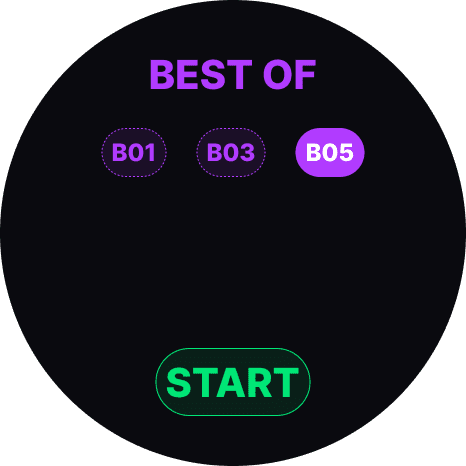

The final app lets players choose a match format, tap to score, undo mistakes, track game progress with haptic feedback when scoring, see deuce states, and get a clear winner moment without interrupting play.
The final app lets players choose a match format, tap to score, undo mistakes, track game progress with haptic feedback when scoring, see deuce states, and get a clear winner moment without interrupting play.
A simple scoring flow built for momentum.
The final app lets players choose a match format, tap to score, undo mistakes, track game progress with haptic feedback when scoring, see deuce states, and get a clear winner moment without interrupting play.

Designed, built, and shipped in two weeks.
Designed, built, and shipped in two weeks.
Out Come
MAX SCORE shipped to the Zepp App Store as a real smartwatch app for the Amazfit Active 2.
The project taught me how much clarity matters when designing for small screens. On a watch, vague design decisions show up immediately. If something is too small, too slow, or unclear, the experience breaks.
Out Come
MAX SCORE shipped to the Zepp App Store as a real smartwatch app for the Amazfit Active 2.
The project taught me how much clarity matters when designing for small screens. On a watch, vague design decisions show up immediately. If something is too small, too slow, or unclear, the experience breaks.
Final Reflection
This project made me a stronger product designer to product devloper because it pushed me beyond screens and into behavior, logic, constraints, performance, and shipping.
Final Reflection
This project made me a stronger product designer to product devloper because it pushed me beyond screens and into behavior, logic, constraints, performance, and shipping.

