DUOLINGO

From Melody to Meaning

A music-based lesson that builds real comprehension.

Designing Music Lessons That Make Language Learning Playful

Learning a language often means chasing streaks and practicing drills. It works for building discipline, but it doesn’t always capture rhythm, pronunciation, or real context. In early conversations, learners told me that songs stick for years while vocabulary fades. They wanted a low-pressure way to listen and understand without feeling put on the spot.

I set out to design an optional, music-based lesson that turns a short song into a micro class. This was a five week student project where I worked end to end, from research through high fidelity prototypes. The project was also personal. With degrees in Spanish and Music, I knew firsthand how music strengthens memory. After years focused on music, I had lost some fluency, and this project became a way to reconnect those two passions.

Role UX/UI Designer & Researcher

Timeline February to April 2025

Tools Figma, FigJam, Photoshop, Otter.AI, Zoom, Google Meet

Figma Prototype

Research

Setting the Score

Before testing the idea of music-based lessons, I outlined a clear research plan to make sure I was asking the right questions and gathering meaningful insights.
I created a structured interview guide to explore how learners currently use music in their studies, what motivates them, and where they encounter challenges. One question I asked was, “Can you tell me about a time when music helped you remember something, like words in another language, school subjects, or even a childhood song?” This encouraged participants to share stories that revealed the deep connection between music and memory.

Finding participants was surprisingly easy. Within a few hours of posting on Discord, I had several volunteers ready to join. Sessions were planned for 30 to 45 minutes and kept flexible so learners could share personal experiences in their own words.

In parallel, I conducted a competitor analysis of language-learning platforms and adjacent apps like karaoke tools. This gave me a sense of how music is already being used to teach or entertain, and what gaps might exist for Duolingo.

The goal of this plan was simple: listen before designing. I wanted to learn whether music genuinely supports memory and comprehension, what kinds of songs feel approachable, and how users might respond to a feature that blends education with play.
“When I sing along, the words just stick without me even trying”

“When I sing along, the words just stick without me even trying”

Listening Before Designing

I began with five interviews, speaking with learners who use Duolingo and others who’d lapsed. I wanted to know what motivates them, where Duolingo helps or falls short, and how they feel about learning with music.

What I heard revealed a clear pattern: music connects powerfully to memory and motivation, but learners still need structure, cultural context, and control.

Key Findings

  • Music sticks. People remember songs for years. Melody and repetition boost recall and pronunciation.

  • Duolingo is a supplement. It’s fun and gamified, but users felt it was weak on conversation and deeper comprehension.

  • Low pressure over performance. Many learners can’t or won’t sing out loud. A no‑audio path is essential.

  • Controls matter. Requests for replayspeed, and karaoke‑style lyrics to follow along.

  • Comprehension first. Learners want questions about meaningsound, and context, not just translation.

Key Insight

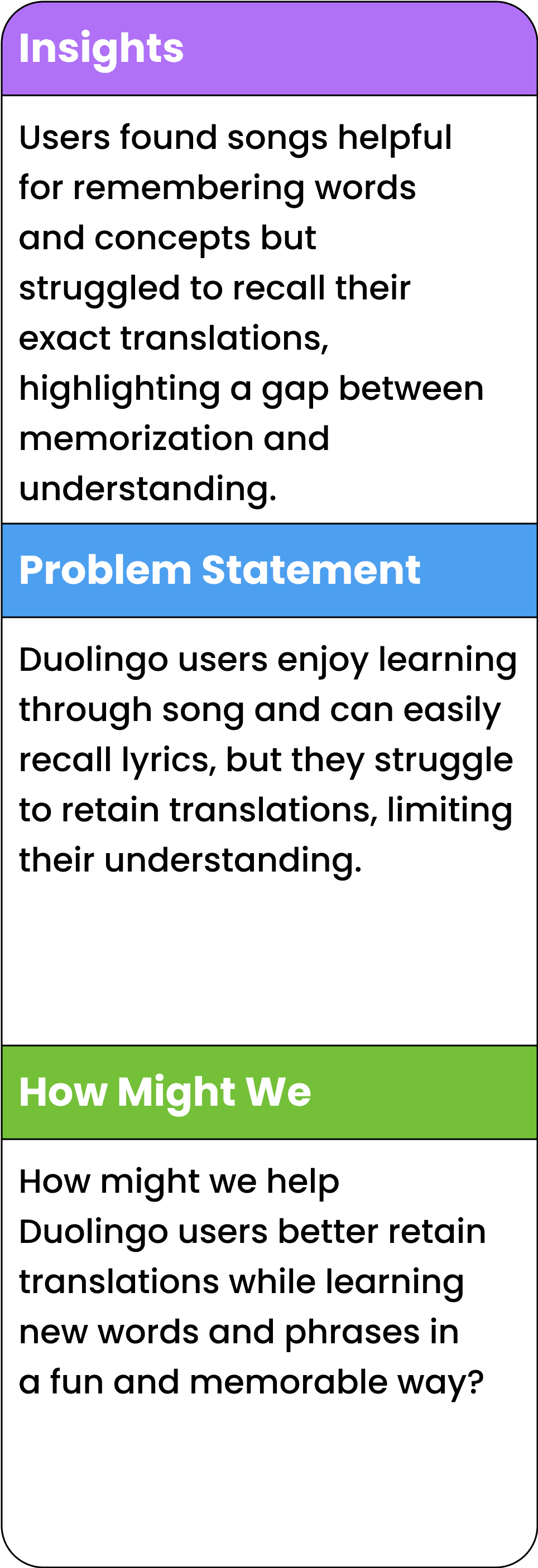
Music has the power to make language learning more memorable and engaging, but only if the design balances fun with comprehension. Songs need to be short, repeatable, and culturally relevant so learners feel both supported and inspired.

One quote stuck with me: “I still remember songs from when I was a kid, even if I cannot translate every line.”

These insights shaped the heartbeat of the project, build a short, music‑based lesson that favors understanding, keeps pressure low, and fits Duolingo’s familiar flow.
Competitive Analysis

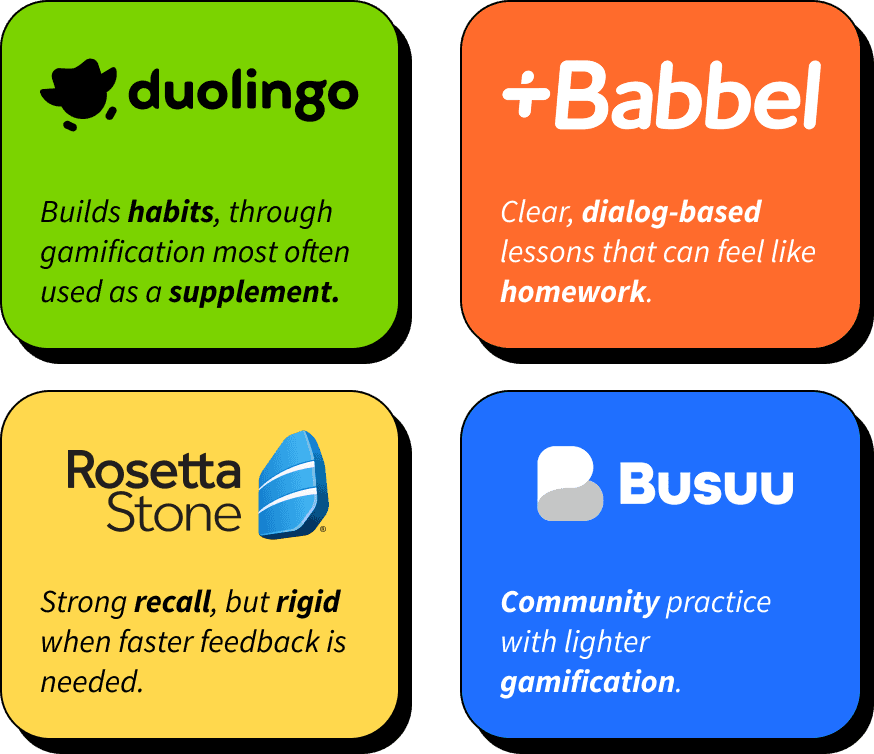
To dive deeper, I explored four popular apps as if I were a new learner, chasing streaks, taking notes, and paying attention to what kept users coming back.

What I discovered

  • Duolingo builds habits but is often used as a supplement.

  • Babbel is clear and dialog based but can feel like homework.

  • Rosetta Stone supports recall but feels rigid when faster feedback is needed.

  • Busuu provides community practice with lighter gamification.

Opportunity

Duolingo already proves that music can teach through its music lessons, yet those mechanics are not used in the core language experience. The opportunity is to bring music into the heart of the app to deepen comprehension while balancing engagement, culture, and conversation.

These findings set up the Define phase, where I turned research into a clear problem statement, and user persona.

“I’m shy about my voice, so I’d probably just listen before I tried to sing along.”

“I’m shy about my voice, so I’d probably just listen before I tried to sing along.”

Define

From Notes to Patterns

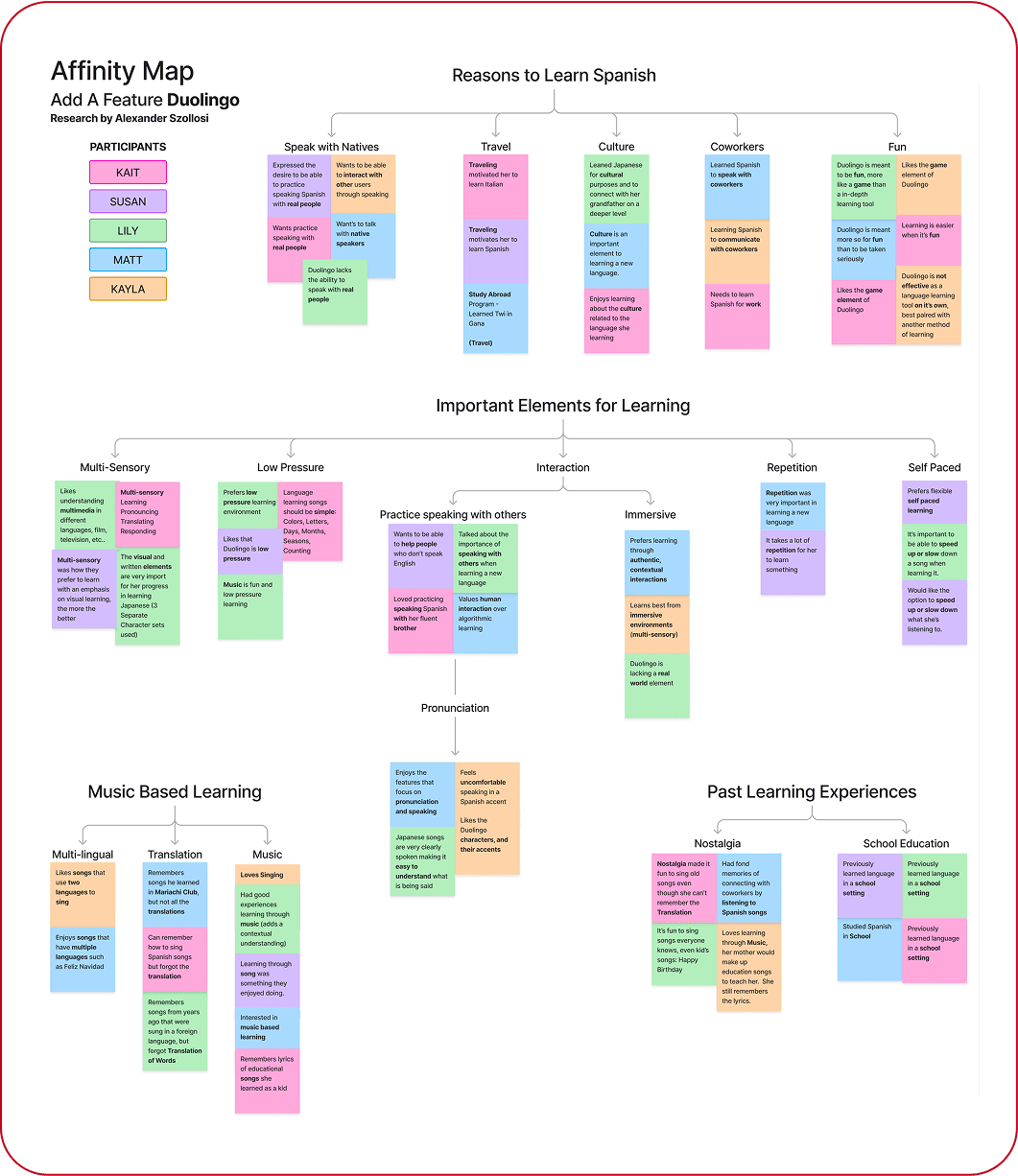
I clustered the insights from the interviews into four themes that captured why people learn Spanish and how they want to learn:

  • Reasons to learn Spanish: speak with natives, travel, culture, coworkers, fun.

  • Important elements for learning: multi-sensory, low pressure, interaction with others, pronunciation, immersive, repetition, self-paced.

  • Music‑based learning: multilingual songs, translation support, and using music as the hook. Songs boost recall and pronunciation.

  • Past learning experiences: nostalgia from childhood songs and school exposure that built a base but lacked context.

Why it mattered

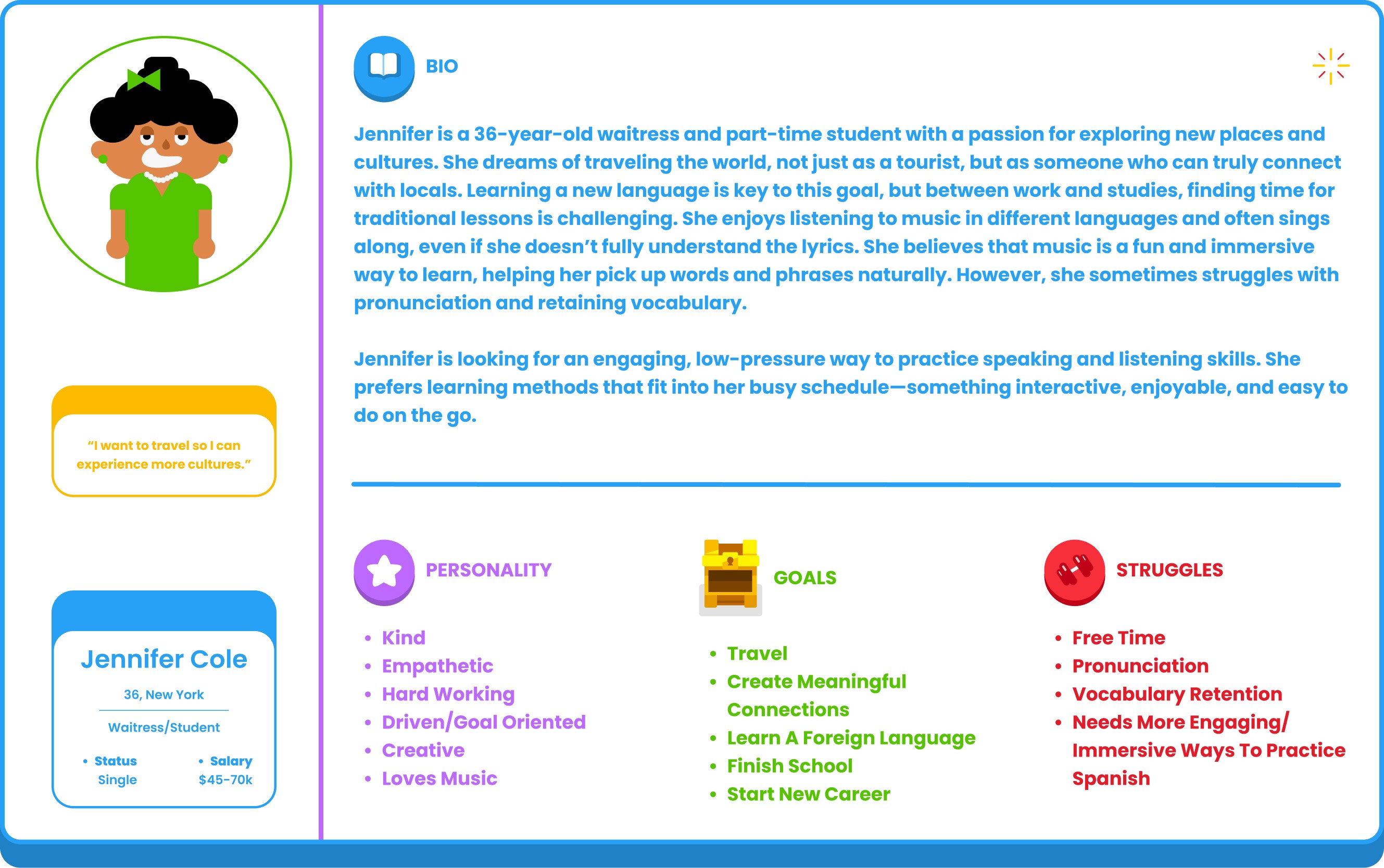
These clusters shaped Jennifer, my user persona, and helped guide the feature toward comprehension focused questions and short sessions that fit busy schedules.

Jennifer stayed at the center of the process so I never lost sight of who I was creating for or why each choice mattered.
Keep the Fun, Add the Meaning
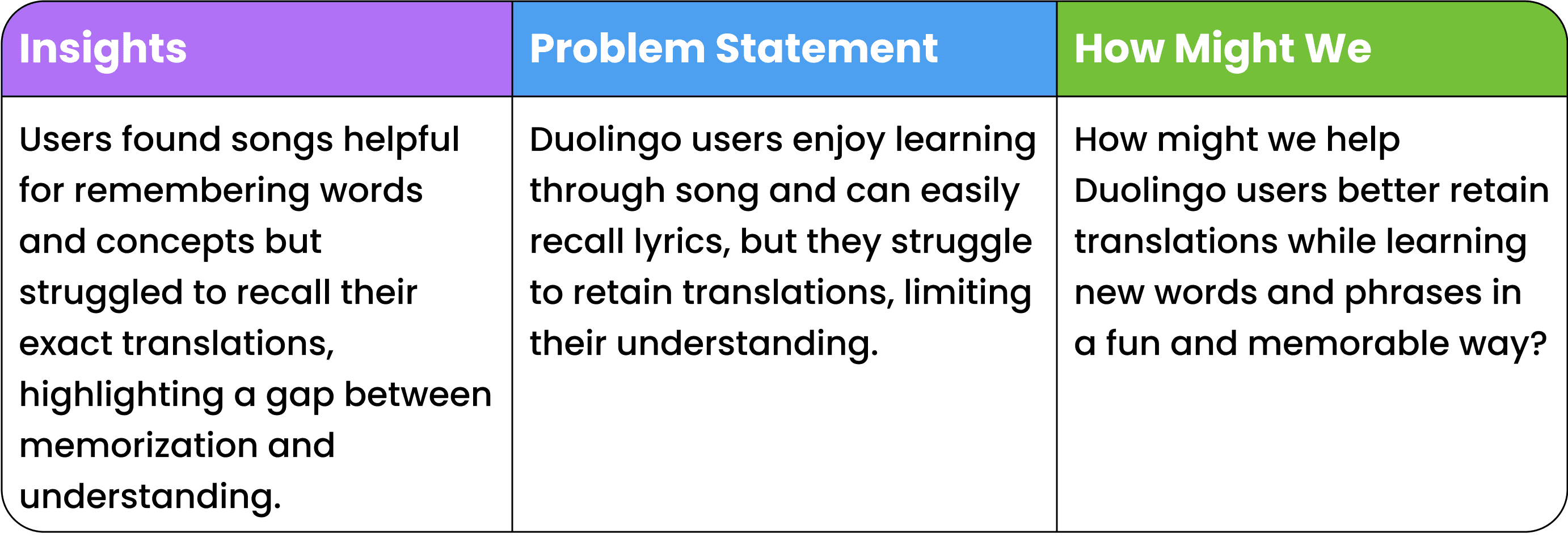
I used this HMW to balance fun with meaning and set my design scope and priorities.

With the challenge defined and a clear user in mind, I moved into design. My goal was to turn these insights into a lesson flow that kept learning fun while making comprehension the focus.

“It helps when I can slow things down and repeat. Songs go by too fast.”

“It helps when I can slow things down and repeat. Songs go by too fast.”

Design

From Notes to Patterns

Principles


I kept four design rules in front of me throughout the process:

  • Comprehension first – focus on meaning, sound, and context.

  • Low pressure – frame lessons around understanding, not performance.

  • Native patterns – stay consistent with Duolingo’s existing interaction styles.

  • Short sessions – keep lessons repeatable and easy to fit into a busy day.

Every choice had to help learners understand without feeling like they were on stage.

What I built

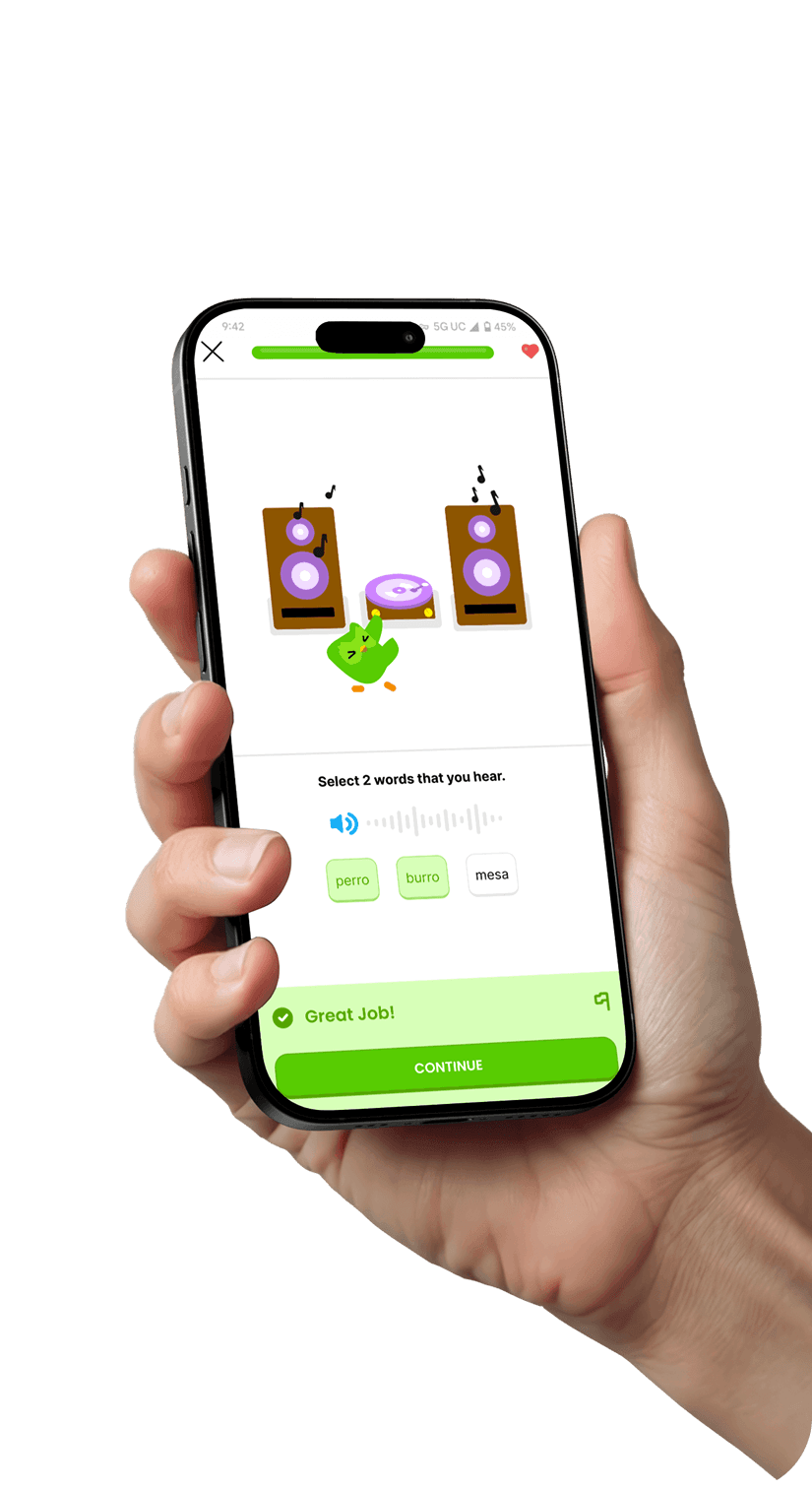
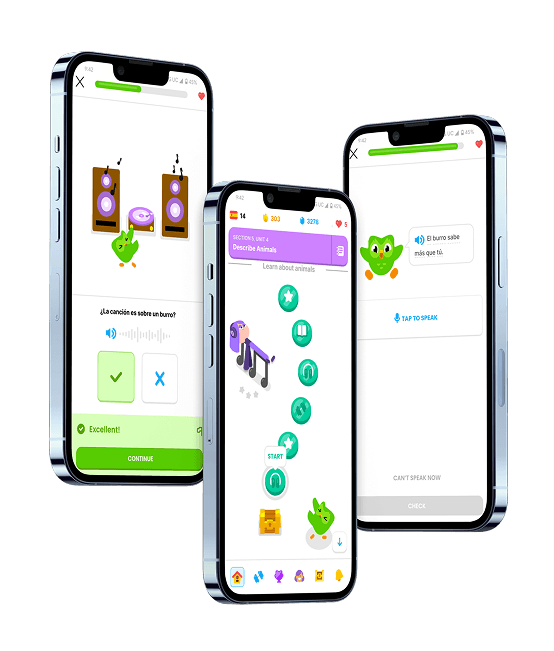
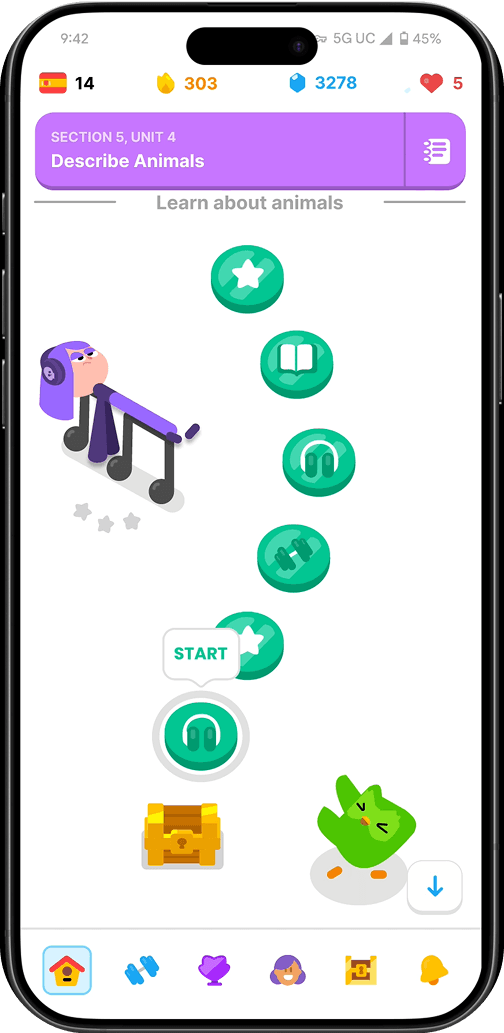
The first version of the prototype was a Spanish music-based lesson designed to feel native to Duolingo:

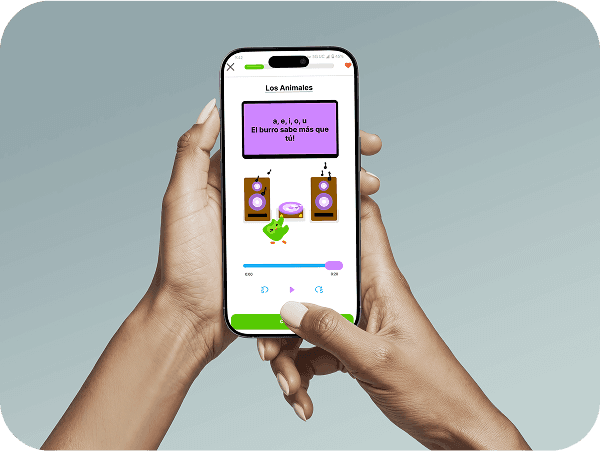
  • The lesson opened with Duo listening alongside the learner, with lyrics on screen and karaoke-style highlighting.

  • A sequence of familiar Duolingo question types checked sound, meaning, and context.

  • robust no-audio path ensured learners could complete the lesson anywhere.

  • Supportive microcopy framed each step as checking understanding rather than performing.

Low Fidelity Wireflow

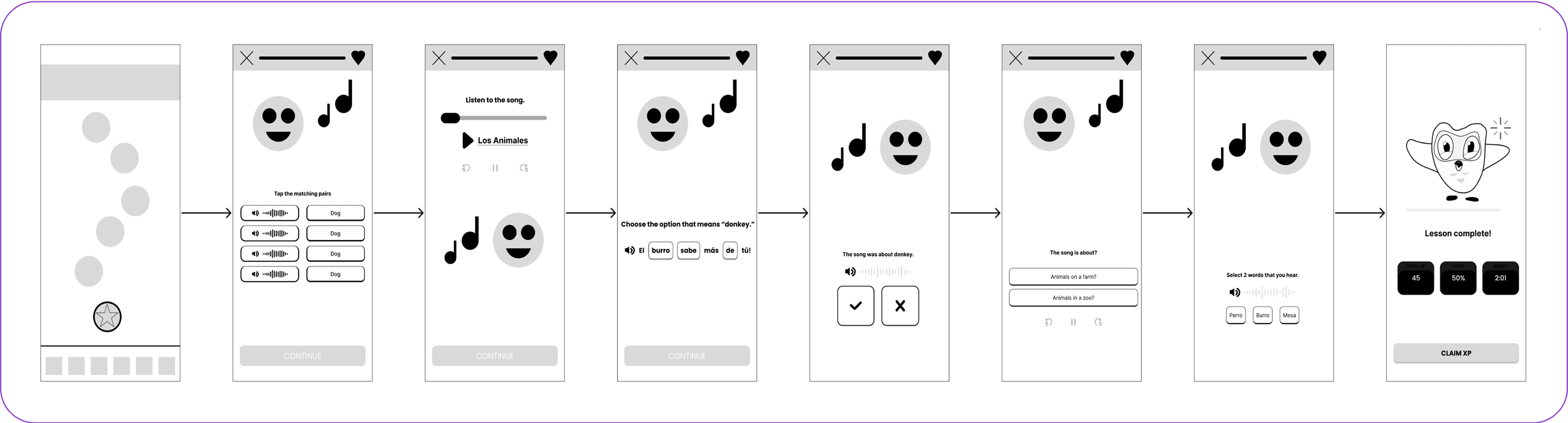
Before visuals, I created a wireflow to test the end-to-end experience.

Wireflow used to test comprehension steps before adding visuals.

Prototype constraints

Because learners are not always able to use audio, and Figma could not play it, I represented playback controls visually and defined their intended behaviors. Testing focused on whether learners could complete comprehension checks without sound, while signaling that replay and speed controls would be included in a future build.

To push my skills, I choose to rebuild from scratch every UI element in Figma with light animation and meticulous polish so it felt native. Several testers said they couldn’t tell it wasn’t the real Duolingo.

UI, Animations, & Components

UI, Animations, & Components

To push my skills, I choose to rebuild from scratch every UI element in Figma with light animation and meticulous polish so it felt native. Several testers said they couldn’t tell it wasn’t the real Duolingo.

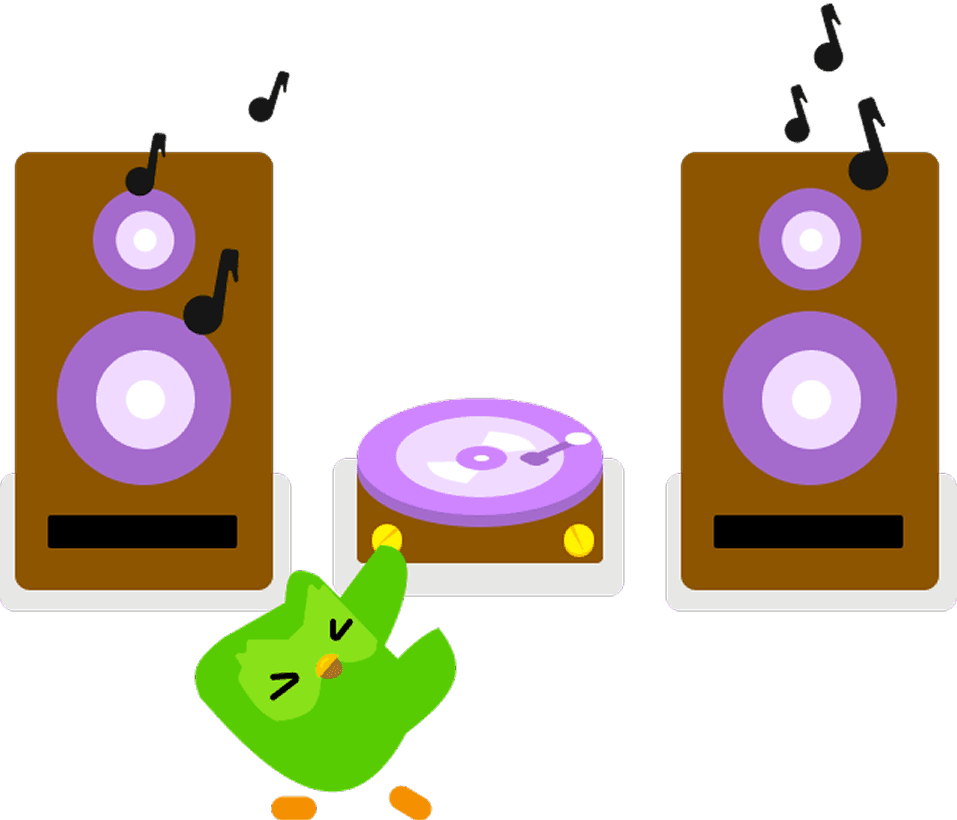
I also created new UI elements (a minimal speaker set and a playful record player) to support the music context while keeping patterns native.

I also created new UI elements (a minimal speaker set and a playful record player) to support the music context while keeping patterns native.

“Music feels like culture, not just language. That’s what makes it fun.”

“Music feels like culture, not just language. That’s what makes it fun.”

From Notes to Patterns

Principles


I kept four design rules in front of me throughout the process:

  • Comprehension first – focus on meaning, sound, and context.

  • Low pressure – frame lessons around understanding, not performance.

  • Native patterns – stay consistent with Duolingo’s existing interaction styles.

  • Short sessions – keep lessons repeatable and easy to fit into a busy day.

Every choice had to help learners understand without feeling like they were on stage.

What I built

The first version of the prototype was a Spanish music-based lesson designed to feel native to Duolingo:

  • The lesson opened with Duo listening alongside the learner, with lyrics on screen and karaoke-style highlighting.

  • A sequence of familiar Duolingo question types checked sound, meaning, and context.

  • robust no-audio path ensured learners could complete the lesson anywhere.

  • Supportive microcopy framed each step as checking understanding rather than performing.

Low Fidelity Wireflow

Before visuals, I created a wireflow to test the end-to-end experience.

Wireflow used to test comprehension steps before adding visuals.

Prototype constraints

Because learners are not always able to use audio, and Figma could not play it, I represented playback controls visually and defined their intended behaviors. Testing focused on whether learners could complete comprehension checks without sound, while signaling that replay and speed controls would be included in a future build.

To push my skills, I choose to rebuild from scratch every UI element in Figma with light animation and meticulous polish so it felt native. Several testers said they couldn’t tell it wasn’t the real Duolingo.

UI, Animations, & Components

I also created new UI elements (a minimal speaker set and a playful record player) to support the music context while keeping patterns native.

Testing & Iterations

Testing
&
Iterations

Does It Hold a Tune?

After building a clickable prototype, I ran five mid-fidelity and five high-fidelity moderated tests to evaluate both desirability and usability.

Testing Goals

  • Confirm the value of a short music-based lesson.

  • Check if comprehension questions worked without audio.

  • See whether karaoke-style lyric highlighting supported understanding.

Tasks & Measures

Participants were asked to select the lesson, view the lyric screen, and complete questions about meaning, sound, and context. I measured task completion, errors, time on task, comprehension accuracy, and self-reported confidence.

Mid Fidelity Wireflow

This version shifted into Duolingo native components so testers were not guessing what boxes and shapes represented. The hierarchy and spacing were tightened to make the lesson flow easier to follow.
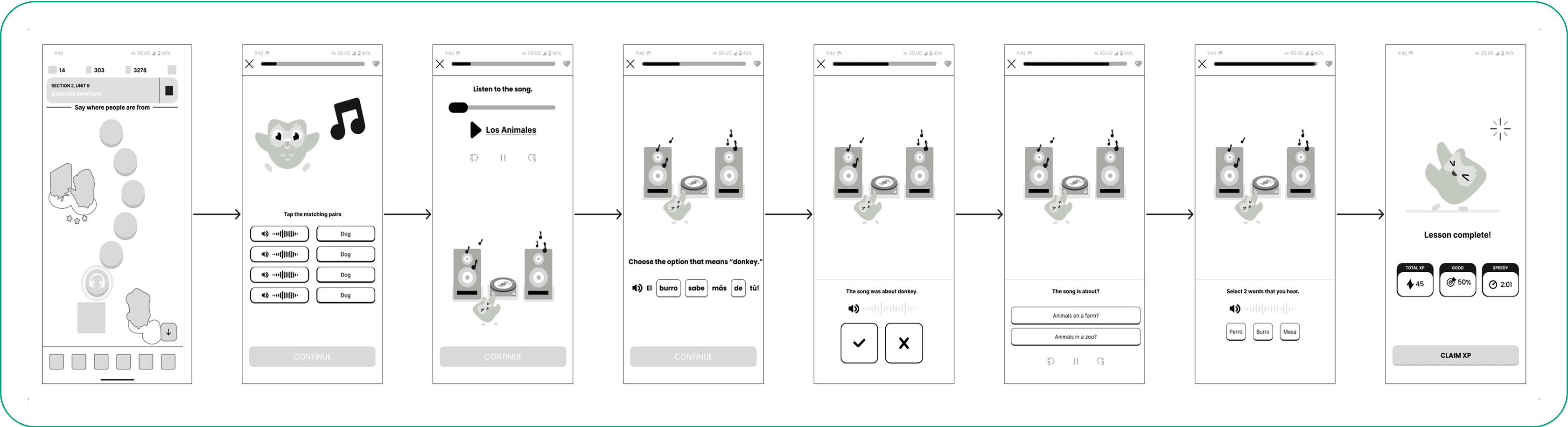
Early wireflow moving into Duolingo-native patterns.

Insights

  • The lesson felt fun and aligned with Duolingo’s brand.

  • Participants wanted more interactivity: follow lyrics, replay, speed control.

  • Navigation and accessibility needed improvement, with clearer button placement and a reliable no-audio path.

Impact

  • Clarified playback controls with labels and icons.

  • Improved button placement for accessibility.

  • Added light hint microcopy and bilingual Spanish/English text where clarity was needed.

  • Strengthened the no-audio path and simplified navigation.

  • Tightened layout and visual hierarchy, keeping everything aligned with Duolingo patterns.

High Fidelity Wireflow 

This iteration mapped every screen and interaction as a blueprint for the final prototype, aligned closely with Duolingo’s design system for consistency and developer handoff readiness.
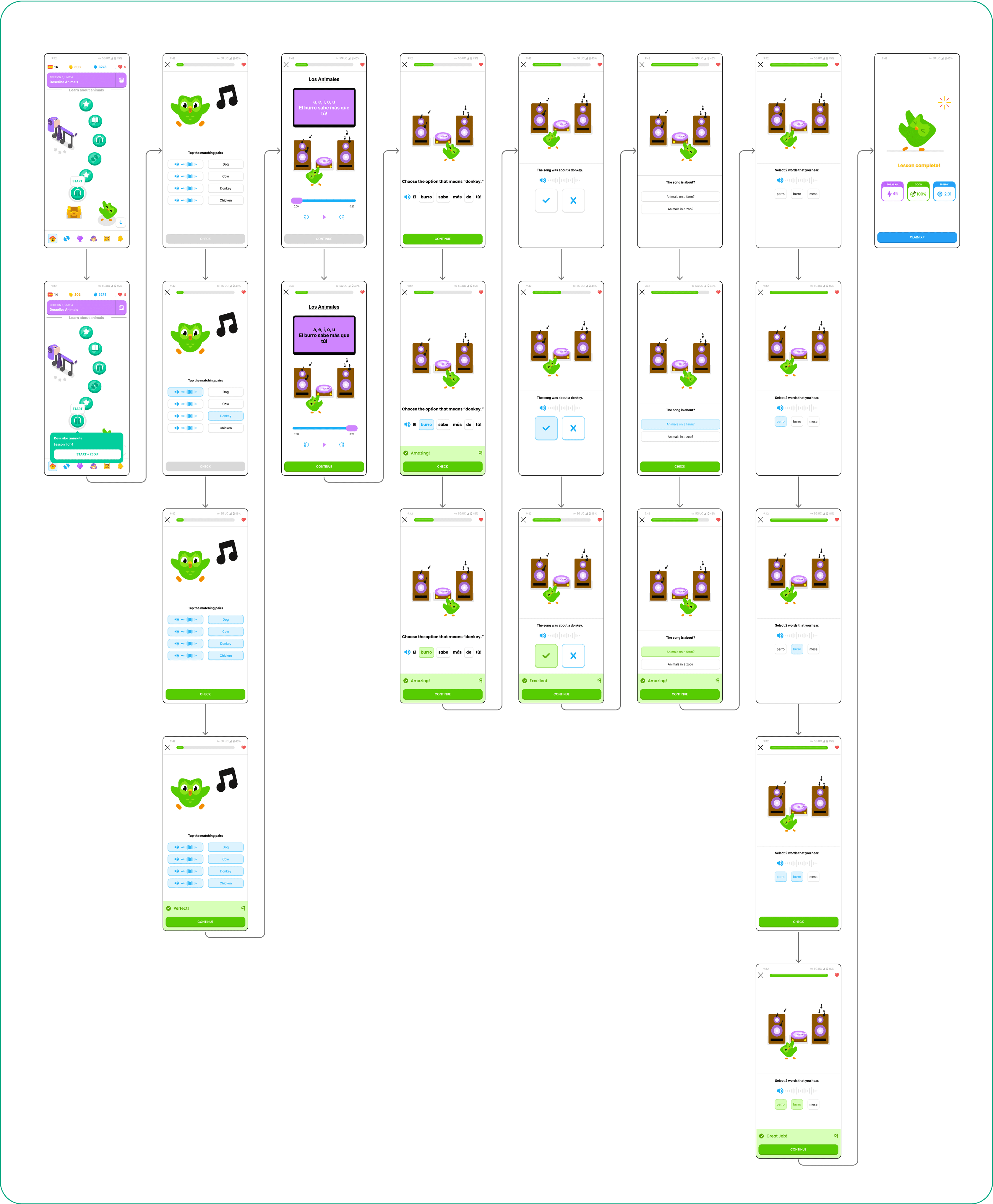
High-fi wireflow mapping every interaction for handoff readiness.

Insights

  • Increased button visibility and standardized styling improved usability.

  • Interaction flow and UI consistency felt smoother across screens.

  • Sharpened microcopy, focus states, and touch targets reduced confusion.

  • Improved lyric highlighting and on-screen feedback cues guided comprehension.

  • A record-back pronunciation check was added for low-pressure practice.
Impact

  • Refined controls, copy, and flow to make the experience intuitive.

  • Finalized the high-fi wireflow as handoff ready, ensuring developers could build once audio support is available.

Outcome

The final prototype delivered a Spanish music-based lesson with lyric highlighting and comprehension-first prompts.

  • In ten total sessions, participants called it fun, intuitive, and on-brand.

  • The no-audio path worked as intended, keeping the lesson low pressure.

  • Meaning, sound, and context checks felt clear and engaging.

  • A short pronunciation moment added playful practice without stress.

Next Steps

Add audio support, expand to a library of songs, and explore richer playback controls.

Design Philosophy: Balancing Fun and Comprehension

Design Philosophy: Balancing Fun and Comprehension
Across every iteration, my guiding principle was simple: music makes learning memorable, but only if comprehension comes first. Designing for low pressure meant giving learners choices like a no audio path and supportive microcopy. Designing for play meant adding lyric highlighting, colorful UI, and light animations that made the lesson feel engaging.

What I learned is that even small design details, such as a replay button, a shift in copy, or the pacing of a song, can make the difference between a stressful performance and an enjoyable learning moment. The final prototype struck that balance, turning music into both a playful hook and a practical tool for understanding.

“I wish I could slow the song down until I really understood it.”
What I Learned

What
I
Learned

Designing With Open Ears

The hardest part was making something new feel native. I chose to recreate every UI from scratch in Figma, including light motion, to test my design and animation skills. Without audio, I made this lesson feel alive through hierarchypacingaffordances, and the tone of prompts. It was hard work, but I loved working on this project, it was genuinely fun. The craft became about small choices that keep pressure low while still checking real understanding.

Designing with music reminded me that melody supports memory, but comprehension is what builds confidence. Iterating from mid‑fi to high‑fi let me tune microcopy, clarify controls, and strengthen focus states and tap targets so it felt on‑brand. More than anything, this taught me how to extend a mature product with a small feature that adds real value.

Key Lessons

  • Trust is built in the details

  • Comprehension matters more than memorization

  • Stay inside native patterns

  • Constraints create focus (no audio)

  • Small features can drive big value

Next Steps

If I had more time I would add real audio, expand to a small song library with replay and speed controls, and set up an A/B test to measure comprehension and confidence gains while keeping a reliable no audio path. I would also explore a lightweight cultural element, such as brief context notes or micro “culture bites,” to honor earlier research without breaking flow.

This project reminded me that good design, like music, is about rhythm and balance. By listening closely to users and focusing on comprehension as much as fun, I created a feature that feels native to Duolingo while adding real value.

Designing With Open Ears

The hardest part was making something new feel native. I chose to recreate every UI from scratch in Figma, including light motion, to test my design and animation skills. Without audio, I made this lesson feel alive through hierarchypacingaffordances, and the tone of prompts. It was hard work, but I loved working on this project, it was genuinely fun. The craft became about small choices that keep pressure low while still checking real understanding.

Designing with music reminded me that melody supports memory, but comprehension is what builds confidence. Iterating from mid‑fi to high‑fi let me tune microcopy, clarify controls, and strengthen focus states and tap targets so it felt on‑brand. More than anything, this taught me how to extend a mature product with a small feature that adds real value.

Key Lessons

  • Trust is built in the details

  • Comprehension matters more than memorization

  • Stay inside native patterns

  • Constraints create focus (no audio)

  • Small features can drive big value

Next Steps

If I had more time I would add real audio, expand to a small song library with replay and speed controls, and set up an A/B test to measure comprehension and confidence gains while keeping a reliable no audio path. I would also explore a lightweight cultural element, such as brief context notes or micro “culture bites,” to honor earlier research without breaking flow.

This project reminded me that good design, like music, is about rhythm and balance. By listening closely to users and focusing on comprehension as much as fun, I created a feature that feels native to Duolingo while adding real value.

Final Note for Employers

I built this Duolingo case study to show my ability to extend a mature product without breaking patterns, turning research into clear, native design. I’m excited to bring that same energy and process to future challenges.

– Max Szollosi, UX Designer & Researcher

Final Note for Employers

I built this Duolingo case study to show my ability to extend a mature product without breaking patterns, turning research into clear, native design. I’m excited to bring that same energy and process to future challenges.

– Max Szollosi, UX Designer & Researcher

Copywrite Ⓒ 2025 Max Szollosi, All Rights Reserved

Copywrite Ⓒ 2025 Max Szollosi,

All Rights Reserved

Copywrite Ⓒ 2025 Max Szollosi,

All Rights Reserved

Create a free website with Framer, the website builder loved by startups, designers and agencies.